Category: Apps (Page 31 of 34)

Sweet Site of the Week – iLounge

Sometimes it’s hard to sift through the millions of websites out there to find the fun, unusual, creative, and especially, the useful ones. And word of mouth can only take you so far. Well, leave it to Gadget Teaser to give you a hand in your search. Once a week, we’ll highlight one of our favorite sites that not everyone knows about. I like to think that we here at Gadget Teaser are performing a public service for you… the avid gadget blog reader the general public.

iLounge

This week’s Sweet Site of the Week is: iLounge

For anything iPhone, iPod, iTouch, or i-Anything related, use iLounge. iLounge is a collection of previews, reviews, articles, and forums on everything iPod. Need a new case for your shiny new iPhone 3G? Check iLounge. Wondering which armband is perfect for your iPod nano? iLounge has the answers. Not sure which software is best for converting your DVDs to iPod? Yep, you guessed it. iLounge will send you in the right direction.

iLounge is well organized and full of useful information. First, they review anything and everything. They have reviews for things like adapters, armbands, and batteries to software, speakers, and even stickers. Of course, they review apps as well.

In addition, they have breaking news and useful articles. The Ask iLounge section has very useful tips and tricks when working with your gear. For example, the Ask iLounge article from 5-8-09 covers the following:

Organizing audiobooks, Problems transferring purchased items back to iTunes, Keeping played podcast episodes on iPod, Transferring iTunes library to a new computer, iPod shows no content, Using a new iPod with an existing iTunes library

And that’s just one article of the dozens on the site.

Another great feature is their link into PriceGrabber from the site. Once you find the item you want, they will link you straight into PriceGrabber so you can find it online at a reasonable price.

So if you’re a i-Anything owner, you should be using iLounge.
Tap Dat App – TripIt

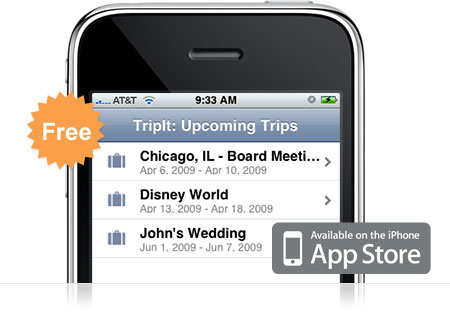
TripItIf you travel… ever… you need TripIt. TripIt is amazing. It’s a free app for your iPhone that keeps all of the information for your upcoming travel itineraries organized and easily accessible from your iPhone. The description says it all:

Use your iPhone to access your TripIt itineraries whether you’re online, offline or in airplane mode.

TripIt is the best way to organize and share your travel plans. Forward your travel confirmation emails to plans@tripit.com, and TripIt automatically creates a master itinerary for your trip, with detailed information about flights, hotels, rental cars and much more. It also includes maps, driving directions and local weather.

I use TripIt all the time. And it’s so easy. Here’s an example of how sweet it is. I booked a flight in June for a 10 day trip and forwarded the itinerary to plans@tripit.com. Immediately the trip showed up on my phone and on the website. Great, right? Well, I actually didn’t book our rental car at the time. We weren’t sure of the details on that yet so we decided to wait. Well, a couple weeks later, we reserved the rental car. I again forwarded the itinerary to the email address. This time I was worried. I thought that I’d have to do some fancy finagling to join the two trips together so I wouldn’t be going back and forth between one trip and the other to keep track of my stuff. To my surprise however, TripIt automatically noticed the car rental was for the same dates and same airport codes as my previous trip and then joined them together. Sweet!

So now, every time I travel, I have my flights, car rental, and hotel information in one place. I also get driving directions and flight status with just a tap on the phone. Pretty much everything you need to get from point A to point B is right there in your hands without digging through emails and printing out a bunch of stuff.

Go ahead and download the free TripIt app and sign up for an account online. You’ll be glad you did when you take your next trip.

NFS: Undercover Powerslides to the iPhone

NFS: Underground on the iPhone.Yesterday, EA mobile released their newest race title, ported for the iPhone. Need for Speed Undercover follows the plot and mechanics of most other NFS titles: infiltrate a underground smuggling/racing ring, race through a few cityscapes, destroy some cop cars on the way. The most interesting part of the game is probably the controls.

Unlike most racers, NFSU has no gas pedal. Your virtual driver just puts the thing to the floor and trusts you to handle the rest. Pressing the screen activates your brake while you steer by simply tilting your phone. As you can imagine, steering can feel a little mushy, a setback EA countered with fairly simple course design. Swipe your finger up on the screen for a nitrous boost, down to enter the Speed Breaker, which is essentially bullet time for cars. I’m glad to see they were thinking of controls when they designed the game. The iPhone as a gaming device can be fairly limited, but obviously there are creative ways to get around the drawbacks.

The only problem I see is the $10 price tag. Sure it’s a complete game, stuffed with 19 cars and a load of customization. Ten bucks still seems stiff for something that I would basically use as a time-killer on long trips in the car or while I’m waiting for a movie to start.

Source: CNet

Apple: Hate Your Parents, Don’t Hate Us

Parental controls keep dead babies out of kids' hands.There’s been much ado about Apple’s iPhone application approval process of late, mostly surrounding the Baby Shaker app and Trent Reznor’s NIN app. Both applications feature “objectionable content,” though one is probably more widely objectionable than the other. It seems like Apple may have learned from iTunes though, and they’re passing the censor scepter to someone else: parents.

With the iPhone OS 3.0 release comes parental controls, giving adults everywhere the ability to add more you-can’t-tell-me-what-to-dos to their certainly heaping collection. By putting censorship in the hands of the user, Apple can open the app store to more mature content, which, as Gizmodo notes, will be necessary if they want to make a serious push toward gaming. Of course, Apple will probably still avoid apps like Baby Shaker. Corporate associations with dead babies just can’t be good for business.

Hulu Gets Disney

Disney and Hulu: Together at last.All I can think is, what took so long? Of course, the deal has been in discussion for some time now, and I’m glad to see it came through. I’m not a huge TV watcher, but when I do, I like it to be streaming high-quality video. That’s the obvious benefit for both viewer and network in this deal. And if that iPhone app goes through, even better. For my severely Lost-addicted friends, this is huge news (maybe we can finally get a beer on Wednesdays?).

So why hasn’t CBS converted? A spokesperson recently gave us a lot of word vomit concerning CBS rights management and profitability in multi-platform blah blah blah blah. Seriously, get with it. Hulu is now the third-most-watched video site on the net, just behind Google (including YouTube) and Myspace. I would really like to see the CBS online viewing numbers, particularly after Hulu’s launch. Now people can catch everything they want in one place. Why bother with a slow CBS server when Hulu can stream anything else almost instantly? Did I mention CBS videos look like trash? I feel a strongly worded letter coming on. Now if they just had a show I cared to watch. I like you, Jay Mohr, but your show isn’t funny.

« Older posts Newer posts »

© 2026 Gadget Teaser

Theme by Anders NorenUp ↑