Tag: best apps (Page 4 of 5)

Boston to Release iPhone App for Municipal Complaints

Is Boston ready for complaints from iPhone users?Managing a city’s complaints can be tough business, even if you just think of the volume. Then there’s sorting through the complaints to see which are valid, which to prioritize, and which can be completely ignored. Most cities have implemented some sort of nonemergency hotline designed to handle the massive numbers of calls and complaints about potholes, downed trees, and wayward neighbors setting their trash out a day early.

Boston is adding a tech-forward method for complaint managment with an iPhone app called Citizen Connect. According to the Boston Globe, the application is the first of its kind, allowing citizens to snap photos of local problems, an overstuffed public trash can, for instance, and send those photos back to City Hall for review.

One of the features that has mayor Thomas Menino excited is GPS positioning. The application makes use of the iPhone’s GPS to pinpoint a problem’s location, making it much easier to address the issue. After submitting a complaint, users will receive a confirmation number. If the problem persists, they can refer municipal employees to the original complaint.

The city plans to pay Connected Bits, a New Hampshire firm responsible for designing the program, $25,000 for a year of support and assess whether the benefit is worth the cost. I’d imagine it’s worth at least that much, something Connected Bits might be likely to notice themselves. As a first-of-its-kind technology, the east coast developer is probably anxiously awaiting positive reviews.

The application also has potential to start some hilarious tech wars. Imagine neighbors snapping shots of every minor ordinance violation on one another’s property. The influx of information could be overwhelming for a city complaint system that’s likely already under a lot of stress.

Citizens of Boston are already crying foul, claiming the announcement is just another election year promise, not likely to come to fruition. The city claims they’ve already submitted the application to Apple for approval. The application will be free on release.

What do you think? Would you use this sort of system if your city had one? Is this just going to create an army of overzealous, iPhone-toting watchdogs? Sound off in the comments.

Palm Hopes to Win Customers With More Apps

Palm Pre App Catalog.It’s no secret that much of the iPhone’s success comes from its development community. There are other great touchscreen smartphones out there, but none with application support behind the iPhone.

That’s no secret to Palm, either, and they’re hoping to offer similar support (albeit on a much smaller scale) to win some customers to the Pre. At launch the Pre sold some 50,000 phones and saw 150,000+ apps downloaded in that first weekend. That’s a solid start, but it won’t be long before Pre owners will want more.

Developers released some new Pre apps yesterday, in the midst of the Apple mayhem. The new titles included LikeMe, a restaurant/entertainment recommendation and rating service, and a sports news app for baseball fans. The Pre catalog is still smaller than tiny (like fewer than 50), but the catalog is still in beta, and only a few developers have the kit. As soon as it goes public, I’m sure you’ll see a more rapid influx of applications. Palm should make that happen soon – there’s sure to be a big rush of developers hoping to lure iPhone 3GS customers in the coming weeks.

Tap Dat App – TripIt

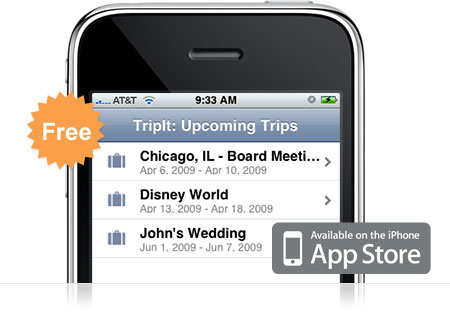
TripItIf you travel… ever… you need TripIt. TripIt is amazing. It’s a free app for your iPhone that keeps all of the information for your upcoming travel itineraries organized and easily accessible from your iPhone. The description says it all:

Use your iPhone to access your TripIt itineraries whether you’re online, offline or in airplane mode.

TripIt is the best way to organize and share your travel plans. Forward your travel confirmation emails to plans@tripit.com, and TripIt automatically creates a master itinerary for your trip, with detailed information about flights, hotels, rental cars and much more. It also includes maps, driving directions and local weather.

I use TripIt all the time. And it’s so easy. Here’s an example of how sweet it is. I booked a flight in June for a 10 day trip and forwarded the itinerary to plans@tripit.com. Immediately the trip showed up on my phone and on the website. Great, right? Well, I actually didn’t book our rental car at the time. We weren’t sure of the details on that yet so we decided to wait. Well, a couple weeks later, we reserved the rental car. I again forwarded the itinerary to the email address. This time I was worried. I thought that I’d have to do some fancy finagling to join the two trips together so I wouldn’t be going back and forth between one trip and the other to keep track of my stuff. To my surprise however, TripIt automatically noticed the car rental was for the same dates and same airport codes as my previous trip and then joined them together. Sweet!

So now, every time I travel, I have my flights, car rental, and hotel information in one place. I also get driving directions and flight status with just a tap on the phone. Pretty much everything you need to get from point A to point B is right there in your hands without digging through emails and printing out a bunch of stuff.

Go ahead and download the free TripIt app and sign up for an account online. You’ll be glad you did when you take your next trip.

Top 3 – Apps Released This Week for the iPhone

Skype iPhone App

It’s time to break through the clutter and get down to business. This weekly post is going to list not the top 10, or the top 5, but the top 3 of anything gadget related. Why the top 3? Because anything more would be watered down.

So without further ado, here are the top 3 Apps released for the iPhone this week.

3. DIRECTV

With the free DIRECTV app you can connect to your home DVR and set it to record something now or in the future. With just a few taps you can search the program guide for movies and shows that are coming up then set any DVR in your home to record it. You can also set it to record Pay Per View content so you can watch it when you get home. Very cool stuff.

2. MLB.com At Bat 2009

MLB.com At Bat Lite is great. With it you can get pitch by pitch coverage of live games and keep up on box scores. You can get play-by-play and video highlights shortly after a play is complete. Upgrade to MLB.com At Bat 2009 and you will get all that plus live Gameday Audio broadcasts for every regular season and postseason game. You can even choose between listening to the home team’s broadcast or the away team’s broadcast. $9.99 is a small price to pay for a season’s worth of MLB audio at your fingertips.

1. Skype

Skype has finally landed on the iPhone. This app gives you the ability to call any of your Skype contacts for free. Anytime you’re connected via WiFi you have the ability to bring up Skype, search and call your contacts, and most importantly, save your precious minutes. If you’re not connected to WiFi, you can still bring up your contact list and instant message anyone else who is online. So make sure you download the free Skype app for your iPhone; because there is nothing better than calling your friends and family for free.

Tap Dat App – BargainBin

BargainBin App

Have you ever purchased an app then found out the next day it went on sale? Or worse yet, the next day it’s free? It happens all the time. Apps constantly go on sale for half off or free. As a user of the App Store, it is frustrating when you just decided to make the purchase only to find out you could have waited a few hours or days to get it heavily discounted.

Well in comes a new free app called BargainBin. According to the apptism, BargainBin’s main features are:

•Sale prices updated as they happen
•Price tags that indicate when apps are: Free or Bargains (50% off or greater)
•Filters that allow you to see Free Apps only, Bargain Apps only, or All apps on sale
•Browsing by a specific category or all Bargains
•Browse only popular apps that have gone on sale
•Viewing screenshots of the application quickly, without having to go to the app store
•Viewing application descriptions quickly, without having to go to the app store

Now that’s what I’m talking about. I have had this app installed for about a week and I love it. I check it everyday. Why not? With just the tap of my finger, I can quickly find everything that is on sale or reduced to free. What a concept!

So head on over to the App Store and make sure you install BargainBin. Cause only fools pay full price for apps.

« Older posts Newer posts »

© 2026 Gadget Teaser

Theme by Anders NorenUp ↑