Category: iPhone (Page 42 of 55)

iPhone 3GS Blows Through 1M Units Over Debut Weekend

iPhone 3GS.It’s getting hard to quantify success of Apple’s iPhone. The iPhone 3GS was the quietest launch of the product line so far, yet they managed to go through a million phones in the first weekend alone, and without too many hangups.

There were some, though, and affected users are likely less than happy. Several new customers saw delayed activation, which may still take some time. Apple hopes to assuage their pain with $30 iTunes gift cards.

Apple’s sales statement included words from Steve Jobs, who’s made headlines recently for his struggle with pancreatic cancer and a recent liver transplant. “Customers are voting, and the iPhone is winning,” Jobs said. “With over 50,000 applications available from Apple’s revolutionary App store, iPhone momentum is stronger than ever.”

Jobs couldn’t be more right, though that could mean trouble for AT&T. Complaints about poor service due to network overload come in the thousands for the iPhone’s sole US carrier. The FCC also recently launched investigations into exclusivity contracts in the wireless market. There’s been no word from the Senate committee.

App Review: iShot Machine – Plenty Of Shots, Just a Few Bugs

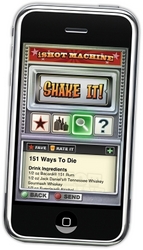
The iShot Machine.Oasys Mobile, the developers behind the Uno-styled card game app “Oh No!” and Hooters Crazy Eights, just released a new application for the drinker in you: iShot Machine.

Like many other shot/cocktail applications, iShot Machine aims to bring as many recipes as possible to your iPhone, making it easy to find that recipe you’ve drunkenly forgotten, all from within a sleek, slot-machine-like interface. Unfortunately, several of the iShot Machine’s features are plagued by bugs or hampered by an awkward search function. Despite its bugs, iShot Machine delivers a decent recipe count in a clean interface that allows you to store your favorites for quick access.

The Good:
First, iShot Machine has more than 3,000 recipes in the paid version, giving you access to a whole load of shots should you need them. That recipe count is just shots, mind you, so if you’re looking for a full cocktail app, you’ll have to look elsewhere. Granted, some of the shots are repeats, like the ‘Vulcan Mind Meld’ and the ‘Vulcan Mind-Probe,’ but with 3,000 options you shouldn’t have too much trouble finding something new.

I’m also a fan of the ‘Favorites’ feature within the app. This makes it easy to find the shots you like best when you’re a bit intoxicated. It’s easy to remember the recipe for a grape bomb, but some of the more complicated drinks may elude you at the bar. Use the favorites feature to keep them close.

Probably the best feature of iShot Machine is simply the quality of the recipes. I frequently spend my weekends bartending, and since the iPhone came out, I have at least one group of people a weekend using applications like this to find their next drink. Most of them are terrible – proportions are off, mixtures curdle like a Cement Mixer, or the product tastes like piss (when it wasn’t meant to). From the couple hundred shots I’ve looked through so far, most of them look legit, and I’m interested to try a few myself.

Lastly, the controls are clean, with options to view shots in full screen or the smaller slot-machine screen below. It’s easy to favorite and rate shots, and wouldn’t be too much trouble to press the right item, even if you were a little drunk.

The Bad:
Continue reading »

More Fuel For My Palm Pre Fury

Palm Pre app downloads are soaring.Palm continues to baffle me. I wrote a post the other day questioning the judgment behind withholding the WebOS SDK from the general public, and to day I find this article from Medialets. It’s an explanation of the Palm strategy to date concerning their App Catalog and includes one hugely disturbing fact.

Pre users have downloaded more than 600,000 apps.

When I read that my thoughts looked something like this: “..” “….” “……??!?!?!??!?!?!” Seriously, what the hell. The phone launch was a relative success, we know that. It wasn’t huge. It wasn’t earth-shattering, but for both Palm and Sprint it was a success.

People want apps, we know that. There have been more than a billion downloads on the iPhone, the Android market continues to grow, and now this. With just 30 apps in the Catalog, users are piling apps on to their phones. Why doesn’t the market at large have the SDK yet?

Medialets cites some interesting theories. First, most of the available apps are in beta. So what, the apps need more testing? Several of these apps are running version 0.9, as in, the last major revision before 1.0. Will they really be so different? Can developers even vouch for their app’s stability under hundreds of thousands of scrutinizing fingers? No, they can’t. Apps are nearly never bug-free at launch, and the growing pains of a new platform are part of the geeky fun of owning a brand new device.

Medialets also suggests the App Catalog isn’t ready for the deluge of submissions that would come with a public SDK. I can understand this. It’s a lot to sort through, and it’s no secret that Palm has been struggling. The number of people required to handle a hundred submissions a day, making sure they (the apps) won’t brick anyone’s Pre, is enormous. Paying those employees will be a serious expense, which leads us to the last problem: money.

It always comes down to money, and the App Catalog has no way to make any. As of today, there’s no payment system in place to reap the rewards of a well-developed app. Palm isn’t the only one hoping for a revenue stream from the store. Developers need to be paid for their time, and their best efforts should be justly rewarded, affording more time for people to put together more great apps.

The problem remains that this wasn’t planned well enough before the Pre’s launch. I can understand and even empathize with Palm for their troubles, but they botched this thing. You can’t expect to launch a phone like the Pre without planning for a payment system for apps you know people will want well in advance. I don’t want to hear “we’re working on it,” or “it’s not ready yet.” Those are crap excuses, and the only reason for them is a complete lack of foresight.

Tap Dat App – AT&T myWireless Mobile

at&t mywireless appAT&T’s free myWireless Mobile app has been out for quite a while now so if you live in the US and don’t have it already, you should. This app is a simple way to view just about everything related your wireless account as well as add features to your plan and monitor your usage. It’s quite convenient and in my opinion, should have been available since the iPhone was first released.

So, from the home page, you can click Bill & Pay, Usage, or Features. Under Bill & Pay, you can view your last payment, payment date, current balance and due date, as well as bring up PDF copy of your current bill. Pretty handy to have that all in one place. AT&T also gives you the option to make a payment from this screen as well. It was nice of AT&T to give us the ability to pay the bill from this app because we all want to make sure AT&T gets their money on time.

The Usage section is just what you’d expect. You are able to view Anytime, Night/Weekend, Mobile to Mobile, and Rollover Minutes used from the main screen. A nice addition for those of us on family plans is that you can also see all this information per individual. This would be convenient for parents as well as nosey husbands or wives. Also available in Usage is your data used which includes messaging as well as internet.

Finally, the Features section is a way to upgrade your plan. AT&T wanted to make sure anyone, anywhere with and iPhone and this app can always add more features to their plan. Not paying enough for your iPhone plan yet? Well go ahead and add Roadside Assistance or maybe VoiceDial for Postpaid. In all seriousness though, if you are traveling abroad it is easy to use this app to add Expanded Internation Roaming or 20 MB Data Global Add-On without having to call customer service.

So there you have it, AT&T myWireless Mobile app for the iPhone. It’s free and convenient so I recommend downloading it.

iPhone 3GS Teardown

Rapid Repair iPhone 3GS teardown.As we learned at the Palm Pre launch, it takes almost no time for fanatical repair geeks/technoporn freaks to strip a gadget down to its bare bones for exhibition. The guys (and probably gals) at Rapid Repair have done just that with the 3GS, showing off her pretty insides to the rest of the world (that felt creepy to write – is this how you felt, Anthony Hopkins?).

Of particular interest are the processor stats and a closer look at the camera. For the processor, the 3GS is running on an underclocked 833MHz CPU. Yes, underclocked. My guess is they’ve done that for heat’s sake, and likely also because there may not yet be a need for that sort of power. Granted, some people will want to pull as much as they can get from the phone, and I wouldn’t be surprised to see a few performance hacks in the near future.

Rapid Repair also reports the camera as capable of 720p recording. Could this be a possible feature in a future OS? Though the new video recording is nice, a quality upgrade would take the phone to a new level as a media device.

Like many new devices, it will probably be a bit before we see the full potential of the 3GS hardware. Rapid Repair calls the CPU running the new iPhone truly cutting-edge, giving unprecedented processing power. I can’t wait to see what that means.

« Older posts Newer posts »

© 2026 Gadget Teaser

Theme by Anders NorenUp ↑