Category: iPhone (Page 43 of 55)

iPhone 3GS Sees A Quiet(er) Debut

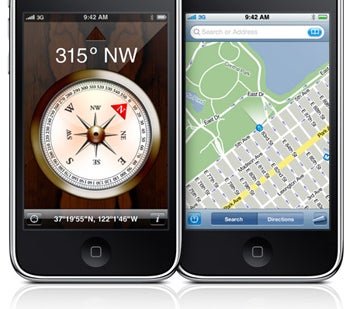
iPhone 3GS showing the new compass.This is the month of phone hype, beyond a doubt. We’ve seen the Pre release, Nokia’s super-expensive N97 spot with LL Cool J, iPhone OS 3.0, and now the iPhone 3GS. Of the phone launches, the biggest is certainly the update iPhone, though it may have come more quietly than the world expected.

Lines outside Apple’s flagship store
in NY reached several hundred, but amidst some rain, they were all shuffled under Apple’s roof making this the smallest iPhone launch yet. Still, AT&T reports hundreds of thousands of preorders for launch day, which dwarfs Palm’s Pre 50,000 first weekend statistic.

It wasn’t just scale that kept the launch quiet, though. In part, it was a lack of hangups that have plagued Apple’s past launches. Apple announced both iPhone OS 3.0 and the iPhone 3GS at WWDC this year, but the set the launch days two days apart. The staggered launch was presumably to reduce server load so that new owners weren’t trying to activate their 3GS while 20 million others were waiting for OS 3.0 downloads. It was a smart move, and it kept problems with the 3.0 release and problems with the 3GS launch (so far, at least) to a minimum.

Now the focus shifts to AT&T and how their network will handle more users hoping to see the wireless carrier make good on promises of MMS and tethering. Will MMS from iPhone users bring the sole US carrier to its knees later this summer?

iPhone OS 3.0 Has Tethering, Now it’s easy to install

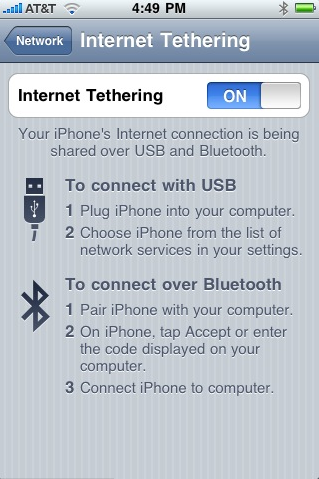
iPhone OS 3.0 TetheringWe already posted a how-to for enabling tethering on your shiny new OS 3.0. While awesome, it is clunky, slow, requires a mac… yada, yada, yada.

Leave it to iClarified to give us a handy and simple way to enable tethering right from the phone. All you have to do is use Safari from the phone and navigate to a specific website. Click a link here, say yes there, and next thing you know, tethering is enabled on your iPhone.

I know someone, who knows someone, who did it (wink, wink) and it was as easy as pie. Click through and try it for yourself. Let’s just say I know it works.

No Word From The FCC’s Wireless Exclusivity Investigations

John Kerry on his cell.On Monday, senators implored the chairman of the FCC, Michael Copps, to take a closer look at exclusivity contracts between wireless carriers and phone manufacturers. The senators are concerned about the effect those contracts have on competition and innovation in the market place.

“We ask that you examine this issue carefully and act expeditiously should you find that exclusivity agreements unfairly restrict consumer choice or adversely impact competition in the commercial wireless marketplace,” said the letter, which was signed by former presidential candidate John Kerry, among others. I’d say it’s highly improbable that our good senators are concerned about anything other than the AT&T/Apple relationship. Several news sources have cited the LG/Verizon relationship where the Voyager is concerned, but that hardly seems as volatile to the market.

It’s fairly clear that exclusivity, at least in the case of the iPhone, limits consumer choice in a big way. Plenty of people don’t want to be on AT&T, but Apple has said several times that Verizon’s network won’t perform at standards required for millions of iPhones. As far as competition goes, it’s probably safe to say that the iPhone has discouraged innovation and encouraged emulation. The Palm Pre may be the sole example of a phone that took the touchscreen concept and improved on it, allowing multitasking, gesture controls, and adding a physical keyboard.

The senators agreed to meet Wednesday to discuss their concerns and determine whether legislative action was necessary. As of yet, there’s no word from Washington.

iPhone OS 3.0 Has Tethering, It’s Just Hidden

iPhone tethering in action.Most of the bad news coming with the iPhone OS 3.0 release is from AT&T, the iPhone’s sole US carrier. Despite most every other iPhone carrier in the world enabling tethering and MMS today, AT&T did not, much to her users’ chagrin.

The software is there, though, and it’s taken less than a day for someone to figure out a hack (for tethering that is – MMS has been around since the first jailbreak). The guys at MacMegasite have a quick and dirty tutorial to get the thing running. In short, all it requires is that you download a carrier settings file and perform a defaults write command in a Mac terminal. Restore your phone while holding option down and you can add the carrier settings update without messing with the rest of your phone. Head to “Network” under your general settings and you should see tethering, with options for USB and Bluetooth functionality.

Early reports suggest things are a little slow, and I have yet to read of a successful PC mod for this. Still, good work from everyone involved with this (seems like MacMegasite, Gizmodo, and AppleNova for some quick credits). Have you tried this yet? Did it work for you?

Full tutorial here.

iPhone OS 3.0 Available For Download

iPhone with OS 3.0.As good as their word, Apple released OS 3.0 for the iPhone today. You’ll need to have iTunes 8.2 installed for the update, which is free for iPhone owners, $10 for the iPod Touch.

In case you’ve forgotten, the OS update brings long-awaited features to the iPhone, like copy and paste, push notification, and universal search, among other things. Finally applications will be able to alert you when you receive new messages, and copy and paste, well I think the benefits there are obvious.

Don’t forget to check back on Friday for an unboxing/review of the iPhone 3GS.

« Older posts Newer posts »

© 2026 Gadget Teaser

Theme by Anders NorenUp ↑