So far I’ve taken you through the paces for creating a great work area and a kick-ass entertainment center. Today is the final installment of Pimp Your Dorm Room, the one where I cover all the extra devices that don’t necessarily have a specific home in your room but will make your college life that much more enjoyable. This is Pimp Your Dorm Room: Everything Else Edition.
Phone
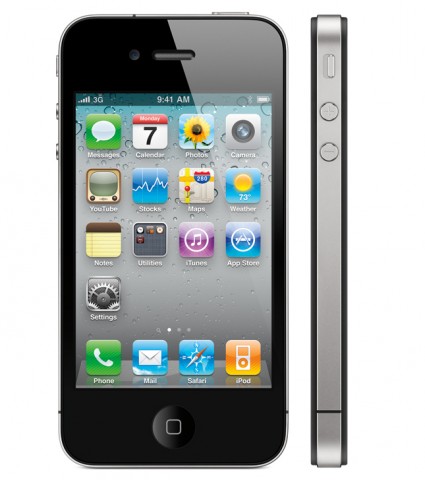 You probably knew I would start out here, and for good reason. Your phone will likely always be on you, and it needs to keep up with your newly active lifestyle. You’ll have more work than ever, probably more fun than ever, and it’s one of the rare times in your life that you’ll be meeting hundreds and thousands of people your own age. Having a phone that can help manage your hectic lifestyle will save you loads of time and plenty of headaches.
As you also might have expected, I’m going to recommend the iPhone. The new iPhone 4 is simply the best phone on the market for handling college’s educational and social demands. Right out of the box you’ll have an intuitive contact management system, full email functionality, a calendar that can sync up with your Google account, a way to record quick voice memos, and an iPod. You’ll also have access to Google Maps, which will be hugely helpful for learning your new hometown. None of these things are really different from other smartphones, but for undergraduate use, they are some of the easiest to use.
What makes the iPhone a great pick over other phones is the App Store. The iPhone dev community is still the fastest growing in the world, and the App Store is constantly adding new distractions. Whether you need educational tools or Facebook, games for some downtime or access to services like Yelp!, the iPhone has the best selection for applications to choose from.
Did I mention you also get a camera with HD video capability? Remember, the best camera is the one you always have with you. When it’s built into your phone, how could you not? The iPhone 4 takes great pictures with the new autofocus/auto exposure and you can edit and upload video to YouTube on the fly. You’ll truly appreciate capturing video on your phone when you get footage of your friends launching various fruits across the quad from a balloon launcher or filling the campuses main arch to the top with snow. I’m not saying I’ve done these things, just positing that it might be fun.
Camera
 As much as I stress getting an iPhone, you’ll probably still want a camera for serious picture taking. The iPhone has no flash, and frankly, a lot of you won’t end up with an iPhone. Get yourself something slim and portable, something you won’t forget when you’re road tripping to visit friends or just making trouble on campus.
For average day to day shooting, get yourself a Panasonic Lumix DMC-ZS1. The camera is small and well-built with enough features to take great pictures. It’s a 10-megapixel compact with decent lens capable of taking 640×480 video at 30fps. The ZS1 starts quickly, so you’re taking pictures just 2.5 seconds after firing it up. Average shot-to-shot time is also excellent for the class, meaning you won’t miss the moment you want to capture most. Amazonhas the ZS1 for just under $219.
Fridge
 Ah, the staple of any dorm room. You will want a minifridge. Whether it’s beverages you need to chill or pizza you’ve pilfered from the cafeteria to get you through a late night study session, something has to preserve your perishables, and it won’t be the smell coming from your hamper.
Check out the Deluxe Mini Fridge-Warmer from ThinkGeek. It can both cool and warm, which is adjustable via digital thermostat, from 44 degrees to 140 degrees. Perfect for the pizza/beverage-of-choice crowd, no? The fridge has a see-through door so you know when it’s time to restock and there’s an On/Off switch for easy defrosting during breaks. Best of all, the fridge comes in under $100.
Alarm Clock
 Several of the gadgets I’ve listed in our Pimp Your Dorm Room guides could technically double as alarm clocks, but sometimes those devices just can’t get the job done. There are few worse feelings than staying up late to study or finish a paper, only to wake up well after that class is over. Avoid the scrambling, the sprinting across campus, the nauseating amount of ass-kissing to make up for your blunder, and get yourself a decent alarm clock.
I recommend the Sonic Boom Alarm Clock with Bed Shaker, again, from ThinkGeek. This puppy cranks out 113-decibel alarms, which even the dead can’t sleep through. If for some reason you don’t waken with bleeding ears, the accompanying bed shaker is bound to rouse you. Slip the little piece under your mattress and just when your alarm shocks you out of that restful slumber, your bed will nearly dump you as well. You can pretty much forget about hitting the snooze button. Why would you want to do that to yourself twice in one morning? The Sonic Boom will run you a pair of Jacksons.
That does it for our this edition of Pimp Your Dorm Room and the Pimp Your Dorm Room guide series. Be sure to check out how to Pimp Your Desk and Pimp Your Entertainment if you missed those. To all of you budding college freshmen, I wish you good luck. The next four years (five or more for some of you) will be some of the best of your life. Enjoy them, and if you’ve taken anything from these guides, enjoy them in style.
 There’s a new app on the Top Paid list this week, one that raises some pretty serious ethical questions. The app is called Offender Locator, and allows iPhone users to access the registered sex offender database from all 50 states, displaying the offenders’ locations, pictures, and all sorts of other personal data.