Tag: Apple (Page 9 of 10)

How Smart Can the iPhone Get?

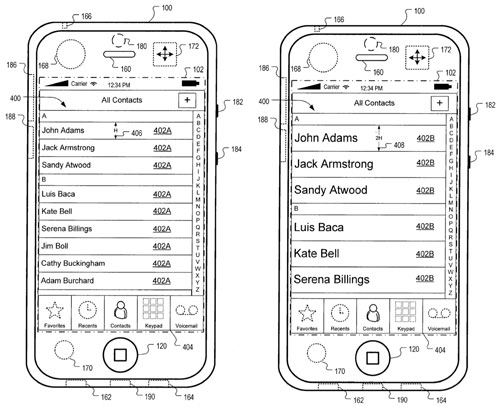
Images from Apple's recent patent filings.According to the popular Mac site Macrumors.com, Apple has filed a couple of patents that point to significant evolution in the iPhone hardware. The iPhone has been criticized since release for lagging behind other ‘smart’ phones, a claim they hope to refute with the impending OS 3.0 release. The new patents point to first-in-market technologies that could further expand the IQ of Apple’s juggernaut.

The first patent deals with new accelerometer-based motion technology that would allow the iPhone interface to change as the phone senses various activities. The patents suggest that the phone could determine whether you are jogging or performing other physical activity and adjust the user interface to include gestures for functions such as answering phone calls or changing tracks in iTunes. The images filed also show a transition to enlarged contact lists during motion, making sifting through contacts a bit easier for a shaky hand.

Other interesting features point to video conferencing with the addition of a user-side video camera. Video recording of any kind remains unavailable on the iPhone until OS 3.0 later this summer. Of course all of this is speculation, but the patents do give us some small window into the research coming out of Cupertino.

Source: Macrumors

Mac Mini on the Cheap Cheap

Apple's Mac MiniReady to join the cult? Rick Broida at The Cheapskate dug up a brand new, non-refurb Mac Mini for just $459 including shipping from J&R.com. A sweet deal, no doubt, even if this is last year’s model sporting last year’s specs.

At my compulsive worst I would have jumped on this thing but, like Rick, I just don’t need another desktop. I currently have two, a custom PC and a PowerMac G5, the latter of which I’ll probably dump on eBay within the month. My MacBook gives me all the  neo-industrial aesthetic I can stomach and won’t require (twist my arm, really) a keyboard, monitor, mouse purchase.

If you’re in the market, curious about OSX, or just need to spend your tax return before your wife can, there are plenty of less appealing ways to do it.

Sweet Site of the Week – mint.com

Sometimes it’s hard to sift through the millions of websites out there to find the fun, unusual, creative, and especially, the useful ones. And word of mouth can only take you so far. Well, leave it to Gadget Teaser to give you a hand in your search. Once a week, we’ll highlight one of our favorite sites that not everyone knows about. I like to think that we here at Gadget Teaser are performing a public service for you… the avid gadget blog reader the general public.
mint.com
This week’s Sweet Site of the Week is: mint.com

If you’re looking for a place to track all your personal finances, set and monitor reasonable budgets, and find ways to save money at the same time, then try mint.com.

Mint.com is a safe and anonymous website that tracks your spending and budgets. It performs most of the tasks that you get from expensive off the shelf software in a free, accessible, and secure environment. In fact, I find it’s easier to use.

First, the setup is a breeze. Just create an account and in just a few minutes you can add all your checking, savings, credit cards, loans, and retirement accounts into the system. You can also add your assets like your home and your car. In fact, mint.com will calculate your home value for you, sum it up along with all your other assets and debts, then give you an estimate of your total worth. Pretty cool.

After the initial set up, mint.com takes over. It will give you suggestions for ways to save money. After you set yourself some budget goals, you can create all kinds of alerts to make sure you are keeping on track. Mint.com will also send you weekly or daily updates regarding what’s happening across all your finances. I even got an email once letting me know that my credit card interest rate was increasing. The email told me I should call and see what’s up and even provided me with the 800 number for that card. That sold me right there.

Oh, and for those of you wondering why I haven’t mentioned Apple in this post, mint.com has a great iPhone app too. Free, of course.

So check out mint.com. You, and your wallet, will be glad you did.

Product Recommendations – iPod Shuffle (3rd Generation)

Apple has been dominating the news lately. They just released a new iMac, Mac mini, and Mac Pro. iTunes recently got an update to version 8.1. The new iPhone OS 3.0 is going to be unveiled on March 17. Apple’s core OS called Leopard is rumored to be replaced by Snow Leopard in June. And there are rumors of Apple purchasing large quantities of 10” touch-screen displays for what might be there first try at a netbook.

Amidst all this, Apple just released their 3rd Generation iPod Shuffle. And the changes from the previous version are quite large for an extremely small device.
Shuffle
As seen from the picture on the right, the 3rd Generation Shuffle is quite small. Half that of the previous version. And you may notice from the picture that all the buttons have been removed from the device. Now you only have a port for your headphones, an off-straight-shuffle slider for turning the device on, and a clip to attach it to your clothes. That’s it. No really, that is it. Where did the rest of it go? To the headphones.

Apple moved the volume and next-last buttons to the headphones. They also added a feature called VoiceOver. The basic premise is that you can adjust the volume or change songs with a click on the headphone wire. Should you want to switch playlists (yes, the Shuffle finally has playlists) you can press and hold until the VoiceOver takes control. It will read to you the current playlist then read to you other playlists. When you hear the playlist you want to listen to, click again and it will start playing it. It does this same thing to tell you the current song you’re listening to. Also, the Shuffle now differentiates between audio books and music, so when you shuffle your songs it won’t play you a chapter of War and Peace.

My recommendation: Thanks, but no thanks. The new features are neat, but sound completely impractical. The best use of the Shuffle is when you’re active. I can’t imagine trying to navigate through songs and playlists while going for a jog. Also, if you misplace the headphones, you get no controls whatsoever. Sure it will play music, but you can’t change the volume or skip songs. What good is that?

I think Apple got a little too fancy on this one. They could have easily put some controls on the device itself. I would recommend purchasing or keeping the 2nd Generation Shuffle and treat the 3rd Generation as a novelty.

« Older posts Newer posts »

© 2026 Gadget Teaser

Theme by Anders NorenUp ↑