Page 239 of 258

Sweet Site of the Week – iLounge

Sometimes it’s hard to sift through the millions of websites out there to find the fun, unusual, creative, and especially, the useful ones. And word of mouth can only take you so far. Well, leave it to Gadget Teaser to give you a hand in your search. Once a week, we’ll highlight one of our favorite sites that not everyone knows about. I like to think that we here at Gadget Teaser are performing a public service for you… the avid gadget blog reader the general public.

iLounge

This week’s Sweet Site of the Week is: iLounge

For anything iPhone, iPod, iTouch, or i-Anything related, use iLounge. iLounge is a collection of previews, reviews, articles, and forums on everything iPod. Need a new case for your shiny new iPhone 3G? Check iLounge. Wondering which armband is perfect for your iPod nano? iLounge has the answers. Not sure which software is best for converting your DVDs to iPod? Yep, you guessed it. iLounge will send you in the right direction.

iLounge is well organized and full of useful information. First, they review anything and everything. They have reviews for things like adapters, armbands, and batteries to software, speakers, and even stickers. Of course, they review apps as well.

In addition, they have breaking news and useful articles. The Ask iLounge section has very useful tips and tricks when working with your gear. For example, the Ask iLounge article from 5-8-09 covers the following:

Organizing audiobooks, Problems transferring purchased items back to iTunes, Keeping played podcast episodes on iPod, Transferring iTunes library to a new computer, iPod shows no content, Using a new iPod with an existing iTunes library

And that’s just one article of the dozens on the site.

Another great feature is their link into PriceGrabber from the site. Once you find the item you want, they will link you straight into PriceGrabber so you can find it online at a reasonable price.

So if you’re a i-Anything owner, you should be using iLounge.
Tap Dat App – TripIt

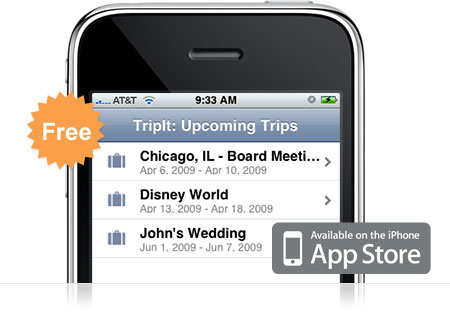
TripItIf you travel… ever… you need TripIt. TripIt is amazing. It’s a free app for your iPhone that keeps all of the information for your upcoming travel itineraries organized and easily accessible from your iPhone. The description says it all:

Use your iPhone to access your TripIt itineraries whether you’re online, offline or in airplane mode.

TripIt is the best way to organize and share your travel plans. Forward your travel confirmation emails to plans@tripit.com, and TripIt automatically creates a master itinerary for your trip, with detailed information about flights, hotels, rental cars and much more. It also includes maps, driving directions and local weather.

I use TripIt all the time. And it’s so easy. Here’s an example of how sweet it is. I booked a flight in June for a 10 day trip and forwarded the itinerary to plans@tripit.com. Immediately the trip showed up on my phone and on the website. Great, right? Well, I actually didn’t book our rental car at the time. We weren’t sure of the details on that yet so we decided to wait. Well, a couple weeks later, we reserved the rental car. I again forwarded the itinerary to the email address. This time I was worried. I thought that I’d have to do some fancy finagling to join the two trips together so I wouldn’t be going back and forth between one trip and the other to keep track of my stuff. To my surprise however, TripIt automatically noticed the car rental was for the same dates and same airport codes as my previous trip and then joined them together. Sweet!

So now, every time I travel, I have my flights, car rental, and hotel information in one place. I also get driving directions and flight status with just a tap on the phone. Pretty much everything you need to get from point A to point B is right there in your hands without digging through emails and printing out a bunch of stuff.

Go ahead and download the free TripIt app and sign up for an account online. You’ll be glad you did when you take your next trip.

Amazon Partners with Schools for Early Kindle DX Adoption

Kindle DX: Coming to a school near you.Alongside the Kindle DX announcement, Amazon CEO Jeff Bezos unveiled plans to partner with several post-secondary schools to get the DX into students’ hands. Included in the schools are Bezos’ own Princeton and the Darden School of Business at the University of Virginia.

Both schools will be giving a Kindle DX to a select group of students, subsidizing a portion of the cost while Amazon picks up the rest. In a flurry of Ivy-league snobbery, Princeton was quick to call their program unique because it focused on using the Kindle as a form of sustainability. Wait, you mean the Princeton Kindles don’t use paper?!? That’s so GREAT! It really warms my eco-friendly heart to hear someone using the Kindle in super innovative ways.

Google Wants to Study Netbook Usability

Google's Android coming to netbooks?This past Thursday, Google posted an ad on Craig’s List asking for users willing to participate in a netbook usability study. Participants would be required to sign a non-disclosure agreement and be paid $75 in American Express gift checks.

The ad was released the same day as Google’s annual meeting, during which CEO Eric Schmidt declined to comment on the future of Android netbooks. From his short press conference, it sounds like Schmidt and the Google squad are looking to keep their web services viable on netbooks, and possibly roll out some new features for the netbook level consumer.

Sounds like business as usual for Google – telling us very little about what they’re actually doing. What kinds of applications are they looking to develop specific to netbook users? What kind of stability issues arise with netbooks/Google products. Why no word on Android?

Source: CNet

iHome Studio Series iP1 Brings Decent Sound at Hefty Price

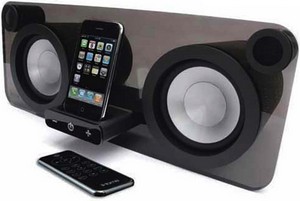
The iHome Studio Series iP1.iPod/iPhone speaker sets are a dime a dozen, usually offer tinny sound in a reasonably mobile package. On rare occasion, they’ll even include some extra features (omg it has a radio!!!) for a few extra bucks. For the most part, though, these things are unimpressive in terms of both sound and user experience.

iHome, a weathered player in the market, hopes to change some of that with their Studio Series iP1. The unit is flashier than most, sporting some “museum quality” acrylic finish between two 4-inch woofers with 1-inch tweeters stacked on top. The unit is driven by a 100-watt amp, giving it enough power to put out some decent sound. An included video port allows you to run video from the attached device while pumping sound through the iP1.

$300 is a little more than I like to spend on a sound system for my apartment, but this thing could be great for the college freshman in your life. The Studio Series iP1 will release some time this July.

« Older posts Newer posts »

© 2026 Gadget Teaser

Theme by Anders NorenUp ↑