Page 206 of 258

Headphone Review: Able Planet Clear Harmony NC1000CH

The ableplanet Clear Harmony NC1000CH.Whether you travel a lot, love listening to music without interruption, or just need some quiet time, you’ve probably considered a pair of noise-canceling headphones. Bose has long been the mainstay of this category of headphones with their Quiet Comfort series, but others are starting to creep into the market with impressive offerings. I’ve spent the last week with one potential contender, the ableplanet Clear Harmony NC1000CH. With the NC1000CH, ableplanet has put together an exceptional product with all the features you would expect from a quality pair of noise-canceling headphones. The company’s only setback could possibly be the lack of brand recognition to your average consumer.

Appearance/Build Quality
When you spend upwards of $300 for a pair of headphones, you’ll probably want something to show for it. The NC1000CH got high marks here. Upon opening the box I was greeted with a hard-shell neoprene case to protect the new phones. The case opens with a zipper to reveal a beautiful set of headphones. In fact, you could easily mistake these for the Bose Quiet Comfort 2 from a distance.

The earcups and headband are padded with a cushy leather to provide easy pressure against your head. The fit is comfortable, and I have yet to feel like I’m going to lose the phones, even when walking around. The earcups fold flat to rest against a tabletop and for storage in the provided case. The cord, which sports an inline volume control, can be removed from the base of the headphones. This is great for long-term storage so you aren’t kinking your cord. It’s also nice to be able to swap out the cord should you want something shorter or perhaps to get rid of the inline volume. In the case you’ll also find a 1/4″ adapter and a dual-prong airline adapter. Continue reading »

Mac Owners Get Blackberry Desktop Manager This September

Blackberry's Desktop Manager for Mac.Blackberry is notoriously skimpy on their Mac support. Every time they roll out a new feature it seems the comments always go, “Great! But what about Mac?” Beg no longer, you Mac/Blackberry users – the Desktop Manager is coming this September.

Shocked with disbelief? Don’t be. It’s a full-fledged version of Desktop Manager – the same thing that runs on PCs. I know, I know, it’s been a long, hard road, and there have been plenty of tears along the way. It’s all over this September, though. You’ll be getting all sorts of new goodies, like iTunes sync for music, calendars, notes, everything really. You’ll also have application support, software updates, the ability to backup and restore your phone (with encrypted backups), and you can even manage multiple devices from the same machine. Now that’s what I’m talking about!

You may have noticed a theme here – the word September with no proceeding date. That’s because there isn’t one. Blackberry has yet to say exactly when the handy new software will be available, so you’ll just have to start watching on September 1.

Blu-ray Control Coming to the iPhone

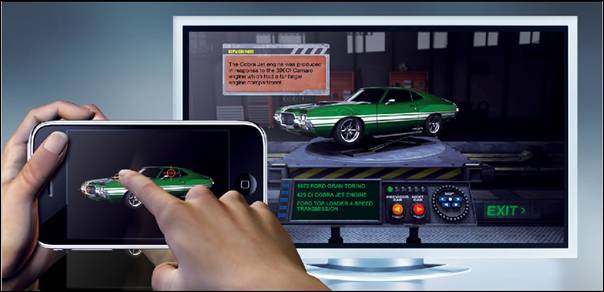
Universal's iPhone Blu-ray app.Universal has a new app coming to the iPhone next week, one that you might not expect from the film studio. It’s a Blu-ray application, one that allows users to download content from BR discs to their iPhone or iPod Touch or even remotely control features on the disc. If you can’t recall, Universal was the last major studio to abandon HD DVD for Blu-ray, officially ending the Blu-ray competitor’s lifespan.

The application launches on the 28th as in conjunction with the Fast & Furious Blu-ray release. Initially, users will be able to view 360 degree models of the various cars from F&F while they watch. For later titles, the app will require an internet-connected Blu-ray player and will include social network integration, allowing you to update your Facebook friends on your movie life.

Universal’s application, which is the first of its kind from the movie industry, will be free. You can see the full press release at PR NewsWire.

Blackberry Storm Drops to $99 on Verizon Contract

Blackberry's Storm.I don’t know about you, but I’ve been patiently awaiting some sort of announcement regarding the release of the Blackberry Storm 2. Yesterday Verizon gave us the cumulus cloud before the…Storm…2. At any rate, Verizon has announced that the original Storm, the 9530, will drop to just $99 on contract. The pricing plan follows the iPhone 3GS release, though the new phone from Apple didn’t drop the iPhone 3G to $99 until its announcement.

This would be the first solid confirmation of an impending Storm 2 release from the biggest wireless network in the US. As is the case with most major releases, Verizon is likely trying to reduce their stock of the old Storm before releasing the new model on the public. The price cut comes just eight months after the initial release of the original Storm last November.

Are you holding out on a contract upgrade for the Storm 2, or is a $99 Storm appealing enough to get you to sign up?

WebOS SDK has its Limitations

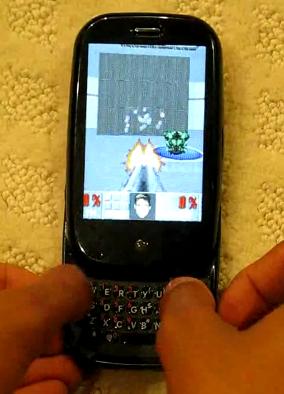
Palm Pre running an OpenGL-less DOOMPalm has finally released their WebOS SDK, giving developers a chance to enter a totally virgin app market. You can bet there are droves of programmers hoping to port their popular iPhone or Blackberry apps to Palm’s web-based OS and maybe make a quick buck. A few of them are already expressing some distaste with the SDK. Some of those developers may even be abandoning the platform before it gets started.

Why you ask? There are two glaring problems. The first is no OpenGL support. Palm was clear that the Pre was not going to be a gaming device. They plainly stated gaming would not be a focus for the phone any time in the near future, in fact, so this isn’t a huge surprise. It still sucks though, in that it limits games to some seriously ugly graphics.

The bigger problem, at least in terms of the number of applications affected, has to do with the phone’s accelerometer. For now, the SDK only allows accelerometer polling at 4Hz. What that means to the layman is the phone only checks its orientation 4 times per second. For smooth graphical transitions you need something on the order of 20Hz, bare minimum. For more advanced applications, like the kind that can measure velocity, you need 50-100Hz. An iPhone application called gMeter currently provides this function, and its actually the gMeter developer, Craig Hunter, who’s pointing this stuff out.

Both of these issues could be updated at some point down the line, but the future may be too late. Limiting a developer’s options doesn’t mean they’re going to find creative workarounds. For a lot of programmers, it means they won’t bother. And that sucks, because Palm has the first truly fresh app store in a couple years, something they could easily use to woo hungry developers.

The silver lining here may be that the App Catalog won’t even release new material until fall at the earliest. Maybe by then Palm will be ready to make some changes. From what they’ve done so far, though, you won’t find me holding my breath.

« Older posts Newer posts »

© 2026 Gadget Teaser

Theme by Anders NorenUp ↑