Category: Websites (Page 19 of 23)

Fantastic Wii Hack for a Lazy Memorial Day

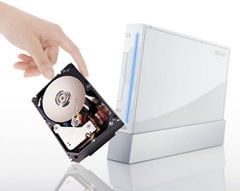
Wii with an hdd.My own Memorial Days are typically full of family revelry: picnics, drinking, outdoor games, too much sun (followed by a week’s incubation and then a week’s worth of peeling). This year, I’m not doing much of anything, and for those of you in similar positions, you may find this Wii hack a productive way to fill your time.

The hack, which comes to us via mikeandheth.com, teaches you how to load your Wii discs from an attached USB hard drive. Without explaining too much (and unnecessarily leeching credit), the hard drive hack saves you all sorts of time and space that you might spend hunting for discs, changing discs, waiting for discs to load, and just about anything else that is limiting about physical media.

The one caveat I’ll offer: M&H do suggest keeping your Wii on older firmware versions than the most current (though they offer plenty of great reasons to do so). If this makes you uncomfortable for any reason, you probably won’t like their guide very much. I will say, though, it’s worth reading, and worth examining some of the hackable possibilities of your Wii. It is yours after all, and despite what Nintendo will tell you, there’s no reason it shouldn’t do what you want.

Why hasn’t Skype really taken off in the US?

SkypeLet me get a few things straight first. I do not work for and am in no way affiliated with Skype. But, Skype is great. It’s free, it’s easy to use, and it’s clear as a bell when talking on it. Conference calls are easy to setup and run. Video calls are clear, not perfect, but clear and sound and look good. Also, it’s becoming more and more available. There is a Skype app for the iPhone as well as other mobile phones and it’s even on the PSP. In addition, they have very inexpensive rates for having your own phone number and making calls to regular phones. Like I said, Skype is great.

So what is the deal? Why isn’t 100% of the US on Skype? What are we waiting for? I’ve read that about 70% of the US is already on broadband. And that number is on the rise. Last time I checked, we are in a recession and money is tight. Skype is free for Skype-to-Skype calls. And Skype is cheap, cheap, cheap for Skype calls to regular phones and cell phones. So what is holding us back?

One thing could be availability. Skype is mostly limited to the home PC. Yes, there is an iPhone app in addition to applications for other mobile phones. The problem with the iPhone app is that it cannot run in the background. You have to open it to use it. You almost have to purposely coordinate with someone to make a free Skype call. Kinda defeats the purpose, right?

Also related to availability is the fact that most people’s home PC is not in a place where they hang out the most. Say you’re chillin with your significant other or your family. You’d have to excuse yourself from the room to go have a Skype call. It’s a bit of a pain in the ass.

Another thing holding people back is that unless you have a microphone on your laptop, you have to purchase another piece of equipment. Purchasing a headset or webcam with a microphone is not expensive, but it is a purchase that most people will probably put very low on their budget totem poll.

But I really don’t think availability or equipment is the real issue. In fact, I’m not sure what the real issue is. I love Skype but I don’t use it as much as I should. I’ve got it on my home PC, my personal laptop, and on my iPhone. Yet, I almost never use it. I keep telling myself that the reason I never use it is because none of my friends are on it. How weak is that excuse? Perhaps if I was on it and always encouraged everyone I know to get on it, they would.

The number of Skype users has grown every year. The number of Skype calls have grown every year. Skype is being used all over the place… and yes, including on Oprah. Europe has taken to Skype and been using it extensively for years. Now it’s our time. If you start using Skype, I will too. Let’s get this thing going and start saving our cellular minutes. Let’s cancel our home phones and just use Skype. It’s just takes a few people to encourage a few more people then next thing you know, we’re all talking for free. I want to talk for free… don’t you?
Sweet Site of the Week – picnik

Sometimes it’s hard to sift through the millions of websites out there to find the fun, unusual, creative, and especially, the useful ones. And word of mouth can only take you so far. Well, leave it to Gadget Teaser to give you a hand in your search. Once a week, we’ll highlight one of our favorite sites that not everyone knows about. I like to think that we here at Gadget Teaser are performing a public service for you… the avid gadget blog reader the general public.

PicnikDo you know about picnik? If not, you need to. Picnik is an awesome site that simplifies the art of photo editing. And it’s free. Yes, they do have a premium service that costs $24.95 a year but most people don’t need it.

Here’s a brief rundown of their services listed on the picnik homepage:

• Fix your photos in just one click
• Use advanced controls to fine-tune your results
• Crop, resize, and rotate in real-time
• Tons of special effects, from artsy to fun
• Astoundingly fast, right in your browser
• Awesome fonts and top-quality type tool
• Basketfuls of shapes from hand-picked designers
• Works on Mac, Windows, and Linux
• No download required, nothing to install

“Fix your photos” is quite vague considering all you can do with your photos. Red eye reduction, teeth whitening, and blemish removing are just the beginning. You can add stickers, frame photos, and add text and effects. They even have a sandbox area where you can play to your hearts content. Best of all, it’s simple to use. And did I mention free?!

Not all of us can be Photoshop geniuses and for those of us who aren’t, be happy we have picnik.

Free Today: Wondershare Music Converter

The Wondershare Music Converter.If you haven’t already, go bookmark Giveaway of the Day now. Right now. As its name suggests, the site offers free stuff everyday, namely software. The only catch? You have to download and install said software before the end of the day.

Today’s giveaway is something you may have been looking for for some time, or at least unwilling to buy. The Wondershare Music Converter is, again, exactly what the name suggests: a program for converting music formats, even those pesky DRM-enabled versions.

Now that the major downloadable music outlets are selling the wares DRM-free, its not such a big deal. If you’re like me, though, you’ve probably got plenty of older music you’d love to unlock, especially if it’s free. If that’s not enough, WMC also allows you to extract the audio from DRM-enabled videos. So get out of here! Go make us a soundboard from those old episodes of Dexter!

Source: CNet

Sweet Site of the Week – iLounge

Sometimes it’s hard to sift through the millions of websites out there to find the fun, unusual, creative, and especially, the useful ones. And word of mouth can only take you so far. Well, leave it to Gadget Teaser to give you a hand in your search. Once a week, we’ll highlight one of our favorite sites that not everyone knows about. I like to think that we here at Gadget Teaser are performing a public service for you… the avid gadget blog reader the general public.

iLounge

This week’s Sweet Site of the Week is: iLounge

For anything iPhone, iPod, iTouch, or i-Anything related, use iLounge. iLounge is a collection of previews, reviews, articles, and forums on everything iPod. Need a new case for your shiny new iPhone 3G? Check iLounge. Wondering which armband is perfect for your iPod nano? iLounge has the answers. Not sure which software is best for converting your DVDs to iPod? Yep, you guessed it. iLounge will send you in the right direction.

iLounge is well organized and full of useful information. First, they review anything and everything. They have reviews for things like adapters, armbands, and batteries to software, speakers, and even stickers. Of course, they review apps as well.

In addition, they have breaking news and useful articles. The Ask iLounge section has very useful tips and tricks when working with your gear. For example, the Ask iLounge article from 5-8-09 covers the following:

Organizing audiobooks, Problems transferring purchased items back to iTunes, Keeping played podcast episodes on iPod, Transferring iTunes library to a new computer, iPod shows no content, Using a new iPod with an existing iTunes library

And that’s just one article of the dozens on the site.

Another great feature is their link into PriceGrabber from the site. Once you find the item you want, they will link you straight into PriceGrabber so you can find it online at a reasonable price.

So if you’re a i-Anything owner, you should be using iLounge.

« Older posts Newer posts »

© 2026 Gadget Teaser

Theme by Anders NorenUp ↑