Category: Reviews (Page 4 of 9)

Booq Boa S Nerve Review: The bag of many pockets

Booq Boa S NerveI have never been satisfied with a laptop bag. They tend to be ugly, unwieldy, and either try to pack too many ridiculous features into a tiny package or leave your cords and chargers to fend for themselves in giant pockets seemingly designed to create a tangled mess. When I got the Booq Boa S Nerve (provided to me by the manufacturer) I figured it would fall under the “too many pockets,” umbrella, but I was surprised. Somehow Booq has managed to make a bag with a pocket for everything without it becoming a cluttered mess. I never thought I would use the phrase “intuitive design” about a bag, but that’s really what it boils down to.

Boa S Nerve inside
As you can see, the inside is packed with pockets, and that doesn’t even show another set that lean against the book you can see pictured in the pouch. The great thing is that all of the pockets have expandable profiles, so when they aren’t in use they don’t take up much space. On that lowest tier there is a set of neoprene pockets for pens and a larger neoprene sleeve I like to use for my Magic Mouse. Inside the larger pouch where the included laptop sleeve sits there are some larger utility pockets made of the same ripstop material as the rest of the inner lining. Those are perfect for chargers, cords, and battery packs. The thing is, you would know this without me telling you. It’s not that I think bags should have labels on the pockets, but when I open a bag and immediately know how to compartmentalize my gear (instead of trying to figure out the best way to store all of my cords and hope they won’t get tangled) I’m a happy guy.

The Boa S Nerve is great down to the smallest details, too. There’s a tag on the inside with a serial number that gets associated with the buyer so that, in the event of a lost bag, you can hopefully get your bag back. There’s a secondary strap on the shoulder strap that clips to the side of the bag, cinching it tight against your body for riding on a bike or if you need to run to catch your public transportation of choice. There’s a little piece of covered plastic on the back whose purpose eluded me until I set the bag on my chair the other day to load it up and just grabbed the thing by what I now recognize as a handle. No, it’s not revolutionary, and I probably should have thought of what it was, but I didn’t, and the fact that I instinctively grabbed the bag there shows me just how much thought went into the design. Right under that there’s a little pocket for your mobile device of choice.

On the whole, it’s the thought that went into this product that makes it great. If you aren’t interested in a messenger style bag, Booq has an entire line of products designed for geeks and tech professionals with a sense of style and a need for quality storage. You can find their line of products at Booqbags.com.

Review: Konnet iCrado

konnet_icradoAs with any new Apple release, the iPhone 4 brought along a menagerie of options for the accessorizing individual. Everyone likes to talk about cases, but the thing I look for first is usually a cradle or a dock – something I can set on my nightstand for charging and use with the phone’s alarm clock.

The Konnet iCrado is about as simple a cradle as you’ll find. It’s a curved piece of metal with a slot for you to use your own cable as the actual data dock. There is a little more to it, though. The curve of the device is designed to improve sound quality for use as speakerphone. I have to say, I thought it was a gimmick at first, but it is nice to have the sound directed toward you. It doesn’t really imrpove much, just aims the sound at your face.

Unfortunately, I’m not much of a speakerphone guy. For the most part I’ll use a headset if I need to do some hands free work, so that isn’t a big selling point. I also don’t like that it requires you to provide the cord. The unit comes slotted for the owner’s cord with a small plastic clip that holds the cord in place. Your phone then sits upright, attached by the cord and leaning against the high back of the unit. I would much prefer that they give you a cord or have the cord connected to a jack at the back. The current method is inconvenient for traveling, and if you lose the piece that holds your cord in place, you’ve got a $30 paperweight with an iPhone-cord-shaped slot in it.

Speaking of price, that’s really the biggest setback. I would forgive the smaller flaws if it didn’t cost $30. At $15 this would be a fine little stand, available in whatever color strikes your fancy.

Vuzix Wrap 310: Great concept, poor execution

vuzix_wrap_310

For as far as we’ve come in technological advances over the years, one thing that still hasn’t been perfected is video eyewear. I’m not exactly sure why anyone would want to have to wear something over their eyes in order to watch a movie when we have things like iPhones, iPads and portable DVD players, but Vuzix – one of the companies at the forefront of video eyewear – clearly believes it’s the future of on-the-go entertainment. But while it’s a great idea in concept, it’s hard to get over just how goofy you look wearing them. Though the latest line from Vuzix isn’t quite Virtual Boy-big – they look more like a pair of sunglasses that you’d buy at the gas station – they’re still a little clunky for something best used during travel.

Vuzix currently has three different models out on the market – the Wrap 230, 310 and 920 – and although the latter version features the biggest screen and best resolution of the bunch, it’s not worth the higher price tag. The Wrap 310 will work just fine for most users, as it offers a home theater experience akin to watching a 55-inch TV from about 10 feet away. The glasses themselves are actually pretty comfortable, but after you’ve plugged in a pair of headphones, the remote control unit, and your iPhone, it suddenly becomes very awkward to carry around. Still, Vuzix has made them as user-friendly as possible. It takes only a few minutes to set up, and the nosepiece is easily adjustable so that the unit can be shared between people of all sizes.

Where the Wrap 310 really falters, however, is in image quality. Though it supposedly boasts two “high-resolution” 428×480 LCD widescreen displays, it has a screen door effect that severely lowers the overall quality – especially when compared to watching a movie on your iPhone or PC. Unfortunately, that makes its appeal even lower, since a majority of the product’s target audience will probably be tech heads who are obsessed with image quality. That’s not to say that you can’t enjoy watching a movie on the Wrap 310 – the picture is decent enough, and you can personalize video settings like brightness, contrast and color saturation via an onscreen menu – but it doesn’t look as good as it probably should.

Playing video games while wearing the glasses is a little surreal, but it can be a bit dizzying (much like virtual reality), and ultimately isn’t worth it considering most people have big screen HDTVs in their homes these days. Sunlight also creeps through unless you’re in complete darkness, and though Vuzix sells a bulky rubber lightshield for $15, it’s something that really should have been included in the package. Of course, when you take into account that one of the main selling points of the Wrap 310 is its stylish, compact design, I can understand why they wouldn’t want to.

There are a few positives to the Wrap 310 – like offering enough room to wear glasses underneath or providing the option to manually adjust the focus for prescription-free viewing – but it’s simply not enough to warrant the suggested $249.99 price tag. Though you can find them for much cheaper on Amazon, it’s an amenity that most people just don’t need. I loved being able to lay around while watching a movie, and it would be great to have a little extra privacy on a plane trip, but until Vuzix can offer a comparable moviegoing experience, it’s probably best to wait.

Review: Technocel PowerPak

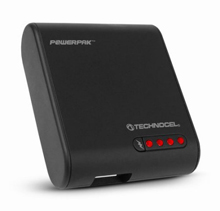
Technocel Powerpak.Battery tech has gotten better over the years but it still has a long way to go. When the Palm Pre launched, one of its “differentiators” was the fact that it had a removable battery, so you could carry an extra for the days you were burning through the juice. For a lot of gadgets, though, that’s not an option.

That’s where external battery packs come in. Technocel recently sent me a PowerPak, a little battery pack that doubles as a charger, and I have to say, I’m in love with the thing.

With the Technocel PowerPak, you get the charging base along with a bundle of charging tips for various devices. You can connect to pretty much anything – micro USB, mini USB, and proprietary connections like Samsung and Sony – while the pack delivers power from a USB socket. Yes, that means you can plug in your iPhone cord and go.

While the PowerPak charges your device, it also charges an internal 1000mAh battery that can be used later by simply plugging in your favorite device. The front features a simple four-LED indicator for the battery’s charge level. As a point of reference, the iPhone 3GS is just over a 1200mAh battery, so this thing can almost get you up to full charge. In my experience, I would get anywhere from 60-80 percent additional battery life from the Technocel PowerPak, depending on how much I used my phone as it charged.

Battery size would be my one gripe about this device. It’s extremely portable and I love that it’s universal in case I need to charge something else in a pinch, but if they could double the battery life, it would be just about perfect. That said, I liked the PowerPak enough to feature it in this year’s Father’s Day Gift Guide over at our parent site, Bullz-Eye.com. The Technocell PowerPak retails for $49.99.

Hercules DJ Control MP3 e2: A beginner’s turntable for wannabe DJs

dj_control

For anyone who’s ever wanted to try their hand at DJing but didn’t have the cash to invest in a turntable and record collection, Hercules has created a pretty nifty solution. Although it’s not the first of its kind, the DJ Control MP3 e2 (not exactly the sexiest name for a gadget) is one of the cheaper and more portable DJ units on the market. It contains everything you’ll need to get the party started, including two jog wheels to navigate your tracks, as well as a cross fader and two volume faders for mixing. You can also add automatic loops and sound effects, control the pitch of each track, and even scratch using the jog wheels, but chances are, most beginners won’t have any idea how a lot of that stuff works.

It’s nice to see that Hercules has included these features in case users want to play around with more advanced techniques in the future, but it’s hard to imagine the DJ Control being used for anything other than casual parties and wedding receptions. This is not a professional unit, nor is it meant to be, but it is pretty user friendly and incredibly well-made for its price. It’s lightweight but sturdy, and can easily be carried around in a backpack with the confidence that it’ll survive the trip in one piece thanks to the inclusion of a tight-fitting, plastic protective cover.

The Virtual DJ software also plays a big part in its accessibility, because while you might not want to mess with all of the knobs and buttons on the actual unit, the drag-and-drop nature of selecting songs from your computer practically guarantees that just about anyone can assume the role of DJ within minutes. Those who upgrade to the Pro version of the software will notice some cool enhancements (namely, the ability to mix music without having to plug the DJ Control into your computer), but it’s really not worth the extra $250 unless you’re really serious about it, in which case you should probably be using a better MP3 turntable.

So is the DJ Control MP3 e2 just an expensive toy? Not exactly. While you’ll need to spend some money to reap the full benefits of the unit (especially if you don’t have a 5.1-channel sound card), it does just enough to warrant its $129 price tag. It’s hard to recommend to those who only plan on using it for simple mixing at parties, but if you also want to record your own tracks and learn the basics of DJing before graduating to something bigger and better, Hercules’ DJ Control does it all without breaking the bank.

« Older posts Newer posts »

© 2026 Gadget Teaser

Theme by Anders NorenUp ↑