![41EDzowMqRL._SCLZZZZZZZ_[1]](https://www.gadgetteaser.com/wp-content/uploads/2009/10/41EDzowMqRL._SCLZZZZZZZ_1-300x199.jpg "41EDzowMqRL._SCLZZZZZZZ_[1]") We have flat-screen TVs that mount directly into our walls, laptops that can pick up wi-fi in airplanes, and cellphones that can browse the Web, play music, and take 10MP pictures — so why are most of us still stuck with old-fashioned wired speakers?
We have flat-screen TVs that mount directly into our walls, laptops that can pick up wi-fi in airplanes, and cellphones that can browse the Web, play music, and take 10MP pictures — so why are most of us still stuck with old-fashioned wired speakers?
Because wireless systems are clunky, expensive, and prone to all kinds of interference, that’s why. Until now, anyway: thanks to a combination of a low $299 price point and deep Amazon discounting, you can get your hands on an Eos Wireless Audio System starter package for less than $180. Given that this includes two speakers — one of which acts as a docking station that charges your iPod while it plays — this is an intriguing development. (Additional speakers — each station can handle up to four — are $115-$150 each.)
So now that Eos has established itself as an affordable option for the budget-conscious wireless audio enthusiast, the only question is whether its system has managed to avoid the “clunky” and “prone to interference” part. And the answer, at least according to several weeks of home testing with the docking station and two speakers the company loaned me for review, is “yes and no.”
On the positive side, these things definitely aren’t clunky. Whether you buy your system in black or (slightly more affordable) white, the Eos is all curves and smoothly sculpted lines, and it’s dead simple to install: I literally plugged in the docking station, plugged in the speakers, and I was on my way. The system links to its satellite speakers via top-mounted antennae with blue LEDs that flash on or off depending on whether they can detect a signal (more on that in a minute). The station, controllable by remote, has its own volume setting, as do each of the speakers, which are controlled by a volume/power knob. It’s kind of a low-tech wrinkle for a high-tech gadget, and if you’re trying to precisely triangulate sound in a large room, it might be an annoyance, but if you’re that kind of listener you’re probably not in the market for the Eos system anyway.
The system’s sound itself will be another issue for audiophiles — but again, because of the limitations of wireless, audiophiles probably won’t be looking at something like this anyway. For what it is, the Eos is more than adequate; it doesn’t have the broadest dynamic range you’ve ever heard, but the company has tried to compensate for a rather thin bottom end by adding 2.1 sound and SRS to the mix. The result is a system that you probably wouldn’t want to blast at top volume, but for ordinary around-the-house listening, it’s just about perfect.
The only real drawback to the Eos — and it is, admittedly, a pretty major one — is an annoying tendency to drop its signal. My kitchen, dining room, and living room are all in one open area, and I arranged the dock and speakers in a triangle far smaller than the system’s advertised 150-foot range, but the Eos kept bumping up against some kind of interference, and the signal would go through random bursts of flickering. It might run for an hour with no issues, then go another hour with each speaker dropping its signal at least once a song. It isn’t the end of the world, but if I’d paid for the system, I’d probably be pretty aggravated, especially since the one option Eos gives you for boosting the signal doesn’t really work if you have the components in the same space — the system’s signal amplifier causes a slight echo that ends up being more annoying than the fade, and in my case, it didn’t even fix the problem.
Hiccups like these are probably to be expected when you’re going the extra mile to avoid dealing with speaker wire, however, and I wasn’t able to find reports of anyone else experiencing the same issue, so it could just be something specific to my environment. And even with the signal fade, the Eos is an attractive, affordable option for anyone looking to free themselves from the tyranny of speaker wires. Just make sure you buy them from a store with a good return policy…just in case.
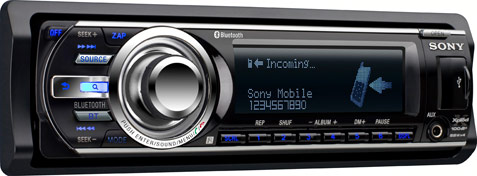
 The Xplod’s appeal doesn’t end with the iPod connectivity. The unit’s Bluetooth capabilities are impressive, to say the least, and are fully compatible with the iPhone 3G and 3GS. The new Phonebook Access Profile feature allows you to browse your linked cell’s phonebook to make a call, save a contact, or download your entire phonebook (up to 300 contacts) for easy access via the Xplod’s Bluetooth menu. Speaking of the menu, there are all sorts of options to play with, whether you want to choose your phone’s ringtone or the stereo’s default tone, enable “Auto Answer” or “Echo Canceller/Noise Canceller Mode,” or set the microphone’s default volume level. And since the unit comes standard with an external microphone in addition to the built-in mic, you’re able to easily improve your audio quality. Finally, if your portable music player supports Advanced Audio Distribution Profile (A2DP), you can stream your audio via Bluetooth.