Category: iPhone (Page 49 of 55)

Will the New iPhone Preview at WWDC This Year?

Steve Jobs with his baby.There has been a whole lot of back and forth today about regarding whether or not Apple will announce its latest iPhone at WWDC this year.

Most folks were saying no, citing Steve Jobs’ absence from the conference this year. Instead, the Keynote will be given by Phil Schiller, Apple’s Senior VP of Worldwide Product Marketing. Prominent Apple analyst Gene Munster thinks the address will primarily deal with software (at a developer conference? No way!), specifically Snow Leopard and the iPhone OS 3.0. Munster expects Apple to hold a special event in late June, early July, which will herald the return of Jobs and the release of a new line of iPhones.

So why wait? We already know the iPhone App Store to be the fastest growing developer community in the world. Wouldn’t Apple want to let that massive developer base know about the new hardware they’ll be working with at…the developer conference? And what makes the Senior VP of Worldwide Product Marketing a bad choice to do this?

Dan Frommer, an analyst at SAI, agrees, and cites quite a few compelling reasons for Apple to roll things out in June. For starters, the first round of iPhone contracts expire in late June. Also, the Palm Pre drops later this month. What better time to get people to start thinking about some new hardware?

Shot through the heart and you’re to blame (Apple) you made Sling downgrade

SlingPlayer MobileWhat a freaking disappointment! All the hype, all the love, and the sugar that was poured on Sling. So I guess it is true. Every rose has its thorn just like every Sling Player App has its guts ripped out of it. I swear that app was going to be a sweet child of mine. But now, I don’t want it, dead or alive.

OK, enough of the bad (or really good depending on your perspective) 80’s hair band lyrics. Seriously though. Have you seen the news? Have you heard what Apple/AT&T did to Sling’s SlingPlayer Mobile app? They gutted it. They sent them back and told them to remove 3G support. Thought it would be too much traffic on the network. Boo hoo. You do know that AT&T has other smart phones with Sling Player apps on them don’t you? And they work over a 3G connection. This just pisses me off. Oh, I almost forgot the best part. They want to charge you $30 for this downgraded, half hearted effort at a mobile Sling app. $30! $30 to stream my TV over WiFi only? You have to be kidding me.

So in case you’re wondering, I will not be downloading the SlingPlayer Mobile app that comes out tomorrow. I will wait for the Hulu app or for Apple/AT&T to loosen their reigns on Sling before that happens.

So until I come on and feel the noise about Sling on 3G, I’m going to take my iPhone down to the app store city, where the apps are free and they work on 3G. Oh won’t this article please end…..

Source: engadget

Your iPhone Just Wants a Beer, Bro

When your iPhone gets hot, feed her some beer.On first sight, just about everyone thinks this iPhone screenie is a fake. As it turns out, the pic is totally legit.

User “Jeff” (not me) over at the iPhone blog submitted the pic after he received the message. He had been sitting next to a pool in Scotsdale, AZ when the doom and gloom message popped up. His solution: “I put the iPhone between two cold beers and it worked!” Well played, sir. Well played.

According to Apple Support, using or leaving your iPhone in direct sunlight can result in this same message. They also say your phone “may still be able to make emergency calls.” May? Is that just some corporate ass-covering in the event of a nuclear fallout?

Source: Gizmodo

Sweet Site of the Week – iLounge

Sometimes it’s hard to sift through the millions of websites out there to find the fun, unusual, creative, and especially, the useful ones. And word of mouth can only take you so far. Well, leave it to Gadget Teaser to give you a hand in your search. Once a week, we’ll highlight one of our favorite sites that not everyone knows about. I like to think that we here at Gadget Teaser are performing a public service for you… the avid gadget blog reader the general public.

iLounge

This week’s Sweet Site of the Week is: iLounge

For anything iPhone, iPod, iTouch, or i-Anything related, use iLounge. iLounge is a collection of previews, reviews, articles, and forums on everything iPod. Need a new case for your shiny new iPhone 3G? Check iLounge. Wondering which armband is perfect for your iPod nano? iLounge has the answers. Not sure which software is best for converting your DVDs to iPod? Yep, you guessed it. iLounge will send you in the right direction.

iLounge is well organized and full of useful information. First, they review anything and everything. They have reviews for things like adapters, armbands, and batteries to software, speakers, and even stickers. Of course, they review apps as well.

In addition, they have breaking news and useful articles. The Ask iLounge section has very useful tips and tricks when working with your gear. For example, the Ask iLounge article from 5-8-09 covers the following:

Organizing audiobooks, Problems transferring purchased items back to iTunes, Keeping played podcast episodes on iPod, Transferring iTunes library to a new computer, iPod shows no content, Using a new iPod with an existing iTunes library

And that’s just one article of the dozens on the site.

Another great feature is their link into PriceGrabber from the site. Once you find the item you want, they will link you straight into PriceGrabber so you can find it online at a reasonable price.

So if you’re a i-Anything owner, you should be using iLounge.

Tap Dat App – TripIt

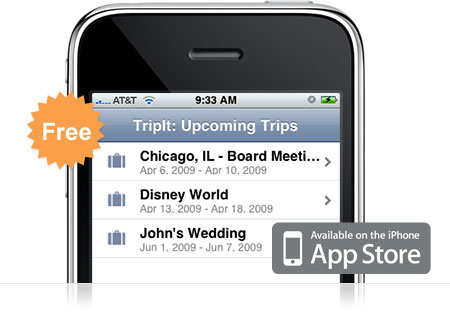
TripItIf you travel… ever… you need TripIt. TripIt is amazing. It’s a free app for your iPhone that keeps all of the information for your upcoming travel itineraries organized and easily accessible from your iPhone. The description says it all:

Use your iPhone to access your TripIt itineraries whether you’re online, offline or in airplane mode.

TripIt is the best way to organize and share your travel plans. Forward your travel confirmation emails to plans@tripit.com, and TripIt automatically creates a master itinerary for your trip, with detailed information about flights, hotels, rental cars and much more. It also includes maps, driving directions and local weather.

I use TripIt all the time. And it’s so easy. Here’s an example of how sweet it is. I booked a flight in June for a 10 day trip and forwarded the itinerary to plans@tripit.com. Immediately the trip showed up on my phone and on the website. Great, right? Well, I actually didn’t book our rental car at the time. We weren’t sure of the details on that yet so we decided to wait. Well, a couple weeks later, we reserved the rental car. I again forwarded the itinerary to the email address. This time I was worried. I thought that I’d have to do some fancy finagling to join the two trips together so I wouldn’t be going back and forth between one trip and the other to keep track of my stuff. To my surprise however, TripIt automatically noticed the car rental was for the same dates and same airport codes as my previous trip and then joined them together. Sweet!

So now, every time I travel, I have my flights, car rental, and hotel information in one place. I also get driving directions and flight status with just a tap on the phone. Pretty much everything you need to get from point A to point B is right there in your hands without digging through emails and printing out a bunch of stuff.

Go ahead and download the free TripIt app and sign up for an account online. You’ll be glad you did when you take your next trip.

« Older posts Newer posts »

© 2026 Gadget Teaser

Theme by Anders NorenUp ↑