Category: Apple (Page 51 of 65)

AT&T Navigator Comes To The iPhone

AT&T Navigator.Being that TomTom showed off their turn by turn navigation system at WWDC, and being that AT&T has hardly mentioned their Navigator app in recent memory, it seems odd that AT&T would be the first to release a turn by turn navigation app.

They were, though, in a free app download today. Don’t let free fool you. The app will add a $10 charge to your AT&T bill.

The application was developed specifically for the iPhone 3GS but it will work with OS 3.0 on other iPhones. The app gives you turn-by-turn navigation, updates traffic information and will let you search by your location for the cheapest gas.

AT&T may have made a smart play here, giving them the early adopters. I’ll be interested to see whether other turn-by-turns run for a similar monthly fee.

iPhone 3GS Pics Are Enough To Shock And Awe

little-italy-9One of the most lauded features of the 3GS is the new and improved camera, which saw a 50% megapixel bump (2 up to 3). The magic isn’t in the megapixels, though, it’s the autofocus/auto exposure functions at the tip of your finger.

I took all of the photos you see in the gallery at a cemetery near my apartment (I realize that sounds a little odd, but it’s a historic site) or just down the street, and I was shocked at the quality. It’s not just that the photos focused well on the objects I chose, but that the camera could also automatically adjust for exposure and white balance, turning typically mediocre photos into some decent shots.

The best feature of the whole thing is that it’s built into the phone. Sure you can take better pictures, but carrying a point-and-shoot everywhere isn’t appealing for most people. I always have my phone, though, so I’ll be able to take great shots whenever the mood strikes. Having those shots on the iPhone also means I’ll be able to share them with remarkable ease. Emailing is fast and simple, and MMS should make things even better.

Angel shot with iPhone 3gsMy only wish now? A Picasa app, developed by Google. As it stands I can view my albums online, but there’s no uploading unless you use something like AirMe or Shozu, both of which are more complicated than they need to be. Neither of apps make clear when your photo is uploaded, and AirMe just drops the photos you upload into an album titled AirMe. I’ll do some more serious digging for this later.

With improvements like Apple has made with the 3GS, I won’t be buying a pocket camera any time soon. The iPhone now fills the point-and-shoot gap in my life. If I want something to take truly great photos, you’ll see my with a DSLR.

Enjoy the gallery. The photos have not been edited in any way, save orientation for the two portrait shots.

AT&T Won’t Charge Extra For MMS If You Have An SMS Bundle

iPhone SMS.The only way I can think of AT&T making the wait for MMS worse would be charging customers extra for the service when it finally goes live. Luckily, it doesn’t seem like they’ll be doing that…to everyone.

In the AT&T iPhone 3GS FAQ PDF the company states in plain language that MMS is coming soon “at no extra cost to customers with a text messaging bundle.”

That plain language leaves some room for interpretation, though. AT&T says they won’t charge you extra for the service, as in no extra fee for sending the messages. But how will they count against your SMS bundle count? If, say, you have the 200 messages plan, which costs $5 under AT&T, will each MMS count as one message, or will they dock your total more for sending videos of your son barfing on the dog?

For now I’ll hope they don’t turn their MMS policy into a “credit” system, whereby they can alter how many credits you get charged per message. We already know that texting plans are a racket. Going to credits could send furious texters into a frenzy.

iPhone 3GS Blows Through 1M Units Over Debut Weekend

iPhone 3GS.It’s getting hard to quantify success of Apple’s iPhone. The iPhone 3GS was the quietest launch of the product line so far, yet they managed to go through a million phones in the first weekend alone, and without too many hangups.

There were some, though, and affected users are likely less than happy. Several new customers saw delayed activation, which may still take some time. Apple hopes to assuage their pain with $30 iTunes gift cards.

Apple’s sales statement included words from Steve Jobs, who’s made headlines recently for his struggle with pancreatic cancer and a recent liver transplant. “Customers are voting, and the iPhone is winning,” Jobs said. “With over 50,000 applications available from Apple’s revolutionary App store, iPhone momentum is stronger than ever.”

Jobs couldn’t be more right, though that could mean trouble for AT&T. Complaints about poor service due to network overload come in the thousands for the iPhone’s sole US carrier. The FCC also recently launched investigations into exclusivity contracts in the wireless market. There’s been no word from the Senate committee.

App Review: iShot Machine – Plenty Of Shots, Just a Few Bugs

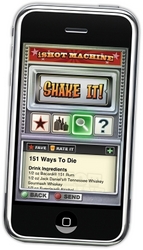
The iShot Machine.Oasys Mobile, the developers behind the Uno-styled card game app “Oh No!” and Hooters Crazy Eights, just released a new application for the drinker in you: iShot Machine.

Like many other shot/cocktail applications, iShot Machine aims to bring as many recipes as possible to your iPhone, making it easy to find that recipe you’ve drunkenly forgotten, all from within a sleek, slot-machine-like interface. Unfortunately, several of the iShot Machine’s features are plagued by bugs or hampered by an awkward search function. Despite its bugs, iShot Machine delivers a decent recipe count in a clean interface that allows you to store your favorites for quick access.

The Good:
First, iShot Machine has more than 3,000 recipes in the paid version, giving you access to a whole load of shots should you need them. That recipe count is just shots, mind you, so if you’re looking for a full cocktail app, you’ll have to look elsewhere. Granted, some of the shots are repeats, like the ‘Vulcan Mind Meld’ and the ‘Vulcan Mind-Probe,’ but with 3,000 options you shouldn’t have too much trouble finding something new.

I’m also a fan of the ‘Favorites’ feature within the app. This makes it easy to find the shots you like best when you’re a bit intoxicated. It’s easy to remember the recipe for a grape bomb, but some of the more complicated drinks may elude you at the bar. Use the favorites feature to keep them close.

Probably the best feature of iShot Machine is simply the quality of the recipes. I frequently spend my weekends bartending, and since the iPhone came out, I have at least one group of people a weekend using applications like this to find their next drink. Most of them are terrible – proportions are off, mixtures curdle like a Cement Mixer, or the product tastes like piss (when it wasn’t meant to). From the couple hundred shots I’ve looked through so far, most of them look legit, and I’m interested to try a few myself.

Lastly, the controls are clean, with options to view shots in full screen or the smaller slot-machine screen below. It’s easy to favorite and rate shots, and wouldn’t be too much trouble to press the right item, even if you were a little drunk.

The Bad:
Continue reading »

« Older posts Newer posts »

© 2026 Gadget Teaser

Theme by Anders NorenUp ↑