Author: Jason Zingale (Page 2 of 3)

GAME REVIEW: The Legend of Zelda: Ocarina of Time 3D

My fondest childhood memory involving video games is beating “Super Mario Bros. 3” with my older brother during a snow day off from school. For many others, it’s probably the first time you sat down to play “The Legend of Zelda: Ocarina of Time.” Still a classic to this day, the Nintendo 64 title was one of the system’s few must-have games, and for good reason. Not only did it represent Link’s first foray into a completely 3D environment, but the open world-based adventure featured the kind of narrative depth that you just didn’t see in video games during that time. Though it’s been re-released quite often over the years (perhaps most notably as the Master Quest pre-order bonus packaged alongside “The Wind Waker”), the new 3DS version has been completely remastered with enhanced graphics and some updated gameplay features.

The first thing you’ll notice is that the 3D looks great. Though Nintendo experienced a bit of a backlash from critics with the initial launch lineup of games, “Ocarina of Time” makes excellence use of the effect, particularly in the more open areas of Link’s adventure. The most welcome change, however, is the addition of the touch-screen inventory system, which allows you to easily access items and weapons on the fly and even features a permanent spot for the map and your ocarina. Additionally, you can now use the system’s gyroscope feature in first-person mode to look around while shooting your slingshot or bow. It’s not for everyone, as some people will likely want to avoid being seen spinning around like an idiot in public, but it’s a nice addition that makes playing the game that much more immersive.

Other cool new features include a hint system that allows players to visit Sheikah Stones for prophetic-like visions on what to do next; a Boss Challenge mode where you can fight all eight bosses back-to-back; and, of course, the Master Quest mode for those that want a slightly different experience on their second go-around. But no matter how much it improves on the original game, “Ocarina of Time 3D” doesn’t quite have the same charm as playing it while sitting in front of the TV. Diehard fans and newcomers would be crazy not to pick this up, but everyone else will be perfectly happy with whatever version(s) they already own.

Weather Doodle now available for the iPad

The Apple iPad may already come pre-loaded with a pretty handy, no-frills weather app, but for those that want their weather forecasts delivered with a bit of style, Tiny Mammal’s Weather Doodle is just the app for you. Although it’s been available for the iPhone since late 2010, the app has finally made its way onto the iPad, and it’s currently on sale for only $0.99 (normally $1.99) through May 23rd.

Weather enthusiasts won’t find too much to get excited about — using individual weather stations within cities across the world, you can access basic info like current conditions, the 5-day forecast, and wind speeds and humidity — but it’s in the presentation where the app really shines. Instead of just seeing a static image of the weather conditions, Weather Doodle depicts it using animated art, whether it’s the moon glowing, snow falling, or lightning striking from storm clouds. There are three different art themes to choose from (with more on the way), but only one of them comes installed with the app. The other two can be purchased for an additional $0.99 each, which is perhaps its biggest shortcoming. Fortunately, the one theme that is included (titled Paperscape, which looks like a grade-school art project using construction paper) is undoubtedly the best of the bunch.

Still, for as appealing as the simple yet beautiful presentation may be (it certainly makes checking the weather more interesting than usual), the lack of any really cool features prevents Weather Doodle from being a must-have app. It’s a great deal at its current sale price, but at its usual $1.99 price point, there’s just not enough there to make it worthwhile.

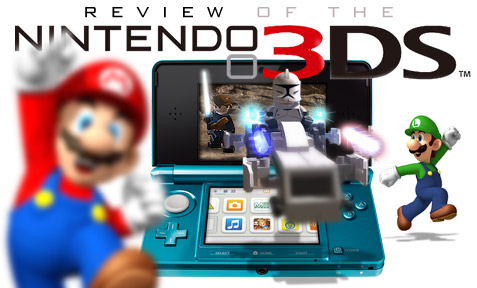
Bullz-Eye reviews the Nintendo 3DS

Unless you’ve been living under a rock for the last few years, you’re well aware of Hollywood’s recent obsession with 3D… only, it’s not just Hollywood that’s obsessed. The video game industry has been eager to embrace this latest fad as well, with the Sony PlayStation 3 already offering several titles that are compatible with 3D-ready TVs. But if there’s been one steady complaint during this whole 3D craze, it’s that in order to take advantage of the technology, you have to wear a pair of clunky (and expensive) shutter glasses. That’s what makes the Nintendo 3DS so appealing, because it’s not only the first handheld device to offer 3D gaming, but also the first to deliver a completely glasses-free experience.

Though the system isn’t without its flaws, I was overall really impressed with what Nintendo has achieved with their latest handheld system. Head over to Bullz-Eye now to read my full review.

Speakal iPig: Impressive sound quality in a cute package

Shopping for a gift for Valentine’s Day can be a challenge if you’ve been with the same person for a long time. Holidays, birthdays and anniversaries add up, and it can sometimes feel like you’ve given that special someone everything they could possibly want. That’s obviously not the case, but if you’re completely out of ideas, you might want to consider Speakal’s iPig docking station for the iPod, which delivers surprisingly great sound in the shape of a bulbous little pig.

Available in pink, yellow, white and black, the iPig might look like something you’d pick up at the toy store, but it’s actually a pretty impressive piece of machinery – something you’ll quickly realize upon feeling the weight and durability of the system. The docking station can be used with any Apple iPod (there are six cradle pieces to choose from, but it even works without one attached) and though your iPhone will try telling you it’s not compatible, it actually is.

The system itself boasts five speakers with a total output of 25-plus Watts, including a 4-inch subwoofer on the bottom of the unit, two speakers on the front that double as the pig’s eyes, and two more underneath its ears. The ears also happen to include the docking station’s coolest feature: touch activated volume control that works better than I could have possibly imagined. Additionally, there’s a handy remote for all of the other controls like play/pause, fast forward/rewind, and bass and treble level adjustment, and you can connect the speaker to a TV or gaming console using the 3.5mm AUX input jack in the back.

Oh yeah, and not only does this speaker get loud (so loud, in fact, that I didn’t dare test to see how high the volume would go at the risk of blowing out my eardrums), but it doesn’t appear to lose any quality as a result. Granted, the cutesy pig design pretty much guarantees that no guy would want to purchase such a speaker system for himself, but between its impressive sound and portable, compact size, the Speakal iPig would make the perfect gift for that gadget-crazy lady in your life.

Vuzix Wrap 310: Great concept, poor execution

vuzix_wrap_310

For as far as we’ve come in technological advances over the years, one thing that still hasn’t been perfected is video eyewear. I’m not exactly sure why anyone would want to have to wear something over their eyes in order to watch a movie when we have things like iPhones, iPads and portable DVD players, but Vuzix – one of the companies at the forefront of video eyewear – clearly believes it’s the future of on-the-go entertainment. But while it’s a great idea in concept, it’s hard to get over just how goofy you look wearing them. Though the latest line from Vuzix isn’t quite Virtual Boy-big – they look more like a pair of sunglasses that you’d buy at the gas station – they’re still a little clunky for something best used during travel.

Vuzix currently has three different models out on the market – the Wrap 230, 310 and 920 – and although the latter version features the biggest screen and best resolution of the bunch, it’s not worth the higher price tag. The Wrap 310 will work just fine for most users, as it offers a home theater experience akin to watching a 55-inch TV from about 10 feet away. The glasses themselves are actually pretty comfortable, but after you’ve plugged in a pair of headphones, the remote control unit, and your iPhone, it suddenly becomes very awkward to carry around. Still, Vuzix has made them as user-friendly as possible. It takes only a few minutes to set up, and the nosepiece is easily adjustable so that the unit can be shared between people of all sizes.

Where the Wrap 310 really falters, however, is in image quality. Though it supposedly boasts two “high-resolution” 428×480 LCD widescreen displays, it has a screen door effect that severely lowers the overall quality – especially when compared to watching a movie on your iPhone or PC. Unfortunately, that makes its appeal even lower, since a majority of the product’s target audience will probably be tech heads who are obsessed with image quality. That’s not to say that you can’t enjoy watching a movie on the Wrap 310 – the picture is decent enough, and you can personalize video settings like brightness, contrast and color saturation via an onscreen menu – but it doesn’t look as good as it probably should.

Playing video games while wearing the glasses is a little surreal, but it can be a bit dizzying (much like virtual reality), and ultimately isn’t worth it considering most people have big screen HDTVs in their homes these days. Sunlight also creeps through unless you’re in complete darkness, and though Vuzix sells a bulky rubber lightshield for $15, it’s something that really should have been included in the package. Of course, when you take into account that one of the main selling points of the Wrap 310 is its stylish, compact design, I can understand why they wouldn’t want to.

There are a few positives to the Wrap 310 – like offering enough room to wear glasses underneath or providing the option to manually adjust the focus for prescription-free viewing – but it’s simply not enough to warrant the suggested $249.99 price tag. Though you can find them for much cheaper on Amazon, it’s an amenity that most people just don’t need. I loved being able to lay around while watching a movie, and it would be great to have a little extra privacy on a plane trip, but until Vuzix can offer a comparable moviegoing experience, it’s probably best to wait.

« Older posts Newer posts »

© 2026 Gadget Teaser

Theme by Anders NorenUp ↑