Author: Gary Fairchild (Page 6 of 15)

Apple Rumor Roundup

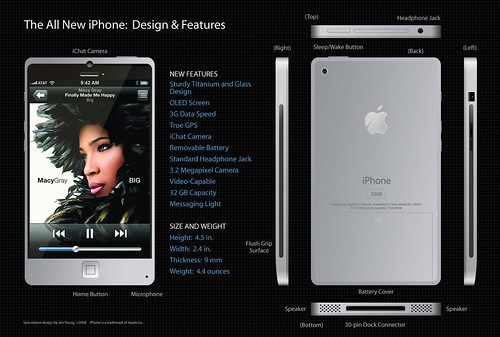
iPhone 4GWired has a link to a rumor that the next generation iPhone will not be announced/released at the next WWDC (Worldwide Developers Conference). This is a slight surprise but not totally unexpected. Instead, it goes on to say, is that WWDC will focus much more on the new Mac operating system OSX Snow Leopard, and the new iPhone OS 3.0. The new iPhone is coming, the question is when.

Two rumors from iClarified. First, the new iPhone OS may actually allow background apps. This could be accomplished by either Apple approving and allowing only certain apps to run in the background or the end user could enable a limited number of apps to run in the background. This is good news for iPhone owners.

Also from iClarified is the rumor that Best Buy already has the new iPhone in their system. What’s interesting to me is the 3 options available in the Best Buy system. I guess it could be 8GB black, 16GB back, and 16GB white but I’m hoping it’s something more than that. Perhaps 8, 16, 32GB or 16, 32GB and a nano??? Highly doubtful but a guy can dream, can’t he.

Shot through the heart and you’re to blame (Apple) you made Sling downgrade

SlingPlayer MobileWhat a freaking disappointment! All the hype, all the love, and the sugar that was poured on Sling. So I guess it is true. Every rose has its thorn just like every Sling Player App has its guts ripped out of it. I swear that app was going to be a sweet child of mine. But now, I don’t want it, dead or alive.

OK, enough of the bad (or really good depending on your perspective) 80’s hair band lyrics. Seriously though. Have you seen the news? Have you heard what Apple/AT&T did to Sling’s SlingPlayer Mobile app? They gutted it. They sent them back and told them to remove 3G support. Thought it would be too much traffic on the network. Boo hoo. You do know that AT&T has other smart phones with Sling Player apps on them don’t you? And they work over a 3G connection. This just pisses me off. Oh, I almost forgot the best part. They want to charge you $30 for this downgraded, half hearted effort at a mobile Sling app. $30! $30 to stream my TV over WiFi only? You have to be kidding me.

So in case you’re wondering, I will not be downloading the SlingPlayer Mobile app that comes out tomorrow. I will wait for the Hulu app or for Apple/AT&T to loosen their reigns on Sling before that happens.

So until I come on and feel the noise about Sling on 3G, I’m going to take my iPhone down to the app store city, where the apps are free and they work on 3G. Oh won’t this article please end…..

Source: engadget

Sweet Site of the Week – iLounge

Sometimes it’s hard to sift through the millions of websites out there to find the fun, unusual, creative, and especially, the useful ones. And word of mouth can only take you so far. Well, leave it to Gadget Teaser to give you a hand in your search. Once a week, we’ll highlight one of our favorite sites that not everyone knows about. I like to think that we here at Gadget Teaser are performing a public service for you… the avid gadget blog reader the general public.

iLounge

This week’s Sweet Site of the Week is: iLounge

For anything iPhone, iPod, iTouch, or i-Anything related, use iLounge. iLounge is a collection of previews, reviews, articles, and forums on everything iPod. Need a new case for your shiny new iPhone 3G? Check iLounge. Wondering which armband is perfect for your iPod nano? iLounge has the answers. Not sure which software is best for converting your DVDs to iPod? Yep, you guessed it. iLounge will send you in the right direction.

iLounge is well organized and full of useful information. First, they review anything and everything. They have reviews for things like adapters, armbands, and batteries to software, speakers, and even stickers. Of course, they review apps as well.

In addition, they have breaking news and useful articles. The Ask iLounge section has very useful tips and tricks when working with your gear. For example, the Ask iLounge article from 5-8-09 covers the following:

Organizing audiobooks, Problems transferring purchased items back to iTunes, Keeping played podcast episodes on iPod, Transferring iTunes library to a new computer, iPod shows no content, Using a new iPod with an existing iTunes library

And that’s just one article of the dozens on the site.

Another great feature is their link into PriceGrabber from the site. Once you find the item you want, they will link you straight into PriceGrabber so you can find it online at a reasonable price.

So if you’re a i-Anything owner, you should be using iLounge.

Tap Dat App – TripIt

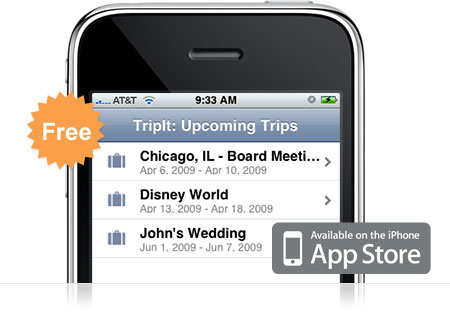
TripItIf you travel… ever… you need TripIt. TripIt is amazing. It’s a free app for your iPhone that keeps all of the information for your upcoming travel itineraries organized and easily accessible from your iPhone. The description says it all:

Use your iPhone to access your TripIt itineraries whether you’re online, offline or in airplane mode.

TripIt is the best way to organize and share your travel plans. Forward your travel confirmation emails to plans@tripit.com, and TripIt automatically creates a master itinerary for your trip, with detailed information about flights, hotels, rental cars and much more. It also includes maps, driving directions and local weather.

I use TripIt all the time. And it’s so easy. Here’s an example of how sweet it is. I booked a flight in June for a 10 day trip and forwarded the itinerary to plans@tripit.com. Immediately the trip showed up on my phone and on the website. Great, right? Well, I actually didn’t book our rental car at the time. We weren’t sure of the details on that yet so we decided to wait. Well, a couple weeks later, we reserved the rental car. I again forwarded the itinerary to the email address. This time I was worried. I thought that I’d have to do some fancy finagling to join the two trips together so I wouldn’t be going back and forth between one trip and the other to keep track of my stuff. To my surprise however, TripIt automatically noticed the car rental was for the same dates and same airport codes as my previous trip and then joined them together. Sweet!

So now, every time I travel, I have my flights, car rental, and hotel information in one place. I also get driving directions and flight status with just a tap on the phone. Pretty much everything you need to get from point A to point B is right there in your hands without digging through emails and printing out a bunch of stuff.

Go ahead and download the free TripIt app and sign up for an account online. You’ll be glad you did when you take your next trip.

Cablevision offering 101Mbps download

Internet ServiceNext week, Cablevision is going to start offering customers download speeds of up to 101 mega bits per second. And while at $99.95 per month it’s not the cheapest internet service, it certainly is the fastest available in the US. Here are some of the details:

The new service will offer download speeds of 101 megabits per second and upload speeds of 15 Mbps for a cost of $99.95 a month. It will be available May 11 to all 5 million of the people in areas served by Cablevision, mainly in the New York City suburbs.

Cablevision is deploying a new technology called Docsis 3 which can utilize more of the capacity of a cable television system for data, offering both higher capacity and lower costs. In Japan, J:Com uses the same technology to offer 160 Mbps service for 6,000 yen ($62) a month.

I can’t say that I’m happy about the pricing but at least the cable companies are moving in the right direction when it comes to speed. For too long other countries have had better, faster, and more reliable internet service. It’s about time our corporate monopoly of ISPs start getting Americans up to speed. Hopefully after the initial investment, they will start lowering prices to compete. Though I’m not holding my breath on that one.

« Older posts Newer posts »

© 2026 Gadget Teaser

Theme by Anders NorenUp ↑